
Best Voice Changer Software for Gaming, Streaming and More
Have you ever wished you could sound like someone (or something) else? With voice changer software, transforming your voice is just a few clicks away. Whether you want to prank your friends as a robot, immerse yourself in a gaming character, or protect your identity online, voice changers open up a world of possibilities.
But with so many voice changer apps available, how do you know which one to choose? In this guide, we‘ll break down the best voice changer software for different needs and budgets. By the end, you‘ll have all the information to pick the perfect voice changer for your next gaming session, prank call, or creative project.
Why Use a Voice Changer?
Before we dive into the top voice changer picks, let‘s explore some of the most popular reasons to use this unique type of software:
Enhance gaming immersion: Get into character by sounding like your avatar in role-playing games. Voice changers add an extra element of realism and fun.
Protect your identity: Stay anonymous in online chats and interactions by disguising your real voice. A voice changer can mask your age and gender.
Create entertaining content: Dub parody voiceovers, create unique character voices for animations, or add humorous effects to video content. The creative possibilities are endless.
Troll your friends: Prank your friends on voice/video calls or in multiplayer games. Make them believe you‘re an AI bot or a celebrity. (Just remember to come clean before they get too freaked out!)
Overcome vocal limitations: If you‘re uncomfortable using your real voice, a changer can give you the confidence to engage in online communities and interactions.
How We Tested and Ranked the Best Voice Changers
To find the top voice changer software, we tested apps on both Windows and Mac computers with these key criteria in mind:
Real-time voice changing: The best apps allow you to transform your voice instantly, without needing to record and edit clips. We rated apps with the smoothest real-time performance higher.
Compatibility: Voice changers need to play nice with the other programs you use, especially games and chat apps. Extra points went to software that worked seamlessly with popular platforms like Skype, Discord, Steam, and major streaming services.
Voice library: The more voices and effects, the better. Top-tier changers offer dozens of preset options plus the ability to create your own unique voices. We also favored apps with design templates.
Ease of use: Changing your voice should be quick and intuitive. Apps with clean interfaces and beginner-friendly tools ranked higher in our list. Confusing, cluttered menus were a no-go.
Pricing: While paid voice changers tend to have more features, we aimed to find the best bang for your buck. Free apps got bonus points, and we favored paid software with free trials or affordable subscription options.
With those criteria in mind, let‘s count down the winners for best voice changer software, starting with the top free pick for Windows.
Best Free Voice Changer: Voicemod

Operating System: Windows
Price: Free (Pro version from $4.99/month)
Voicemod is our pick for the best free voice changer for Windows, thanks to its intuitive design, real-time voice changing, and extensive library of voice effects. While some features are limited to the paid Pro version, the free app still offers plenty of tools to play with.
Key features:
- 60+ voice and sound effects, including male, female, robot, alien, monster, and animal voices
- Voice maker tool to create custom voices and sonic personas with effects like pitch shift, reverb, and chorus
- Meme soundboard to trigger funny sound effects, music clips and audio memes while gaming or chatting
- Excellent compatibility with chat platforms like Skype and Discord, plus popular games such as Fortnite, PUBG, Minecraft, and GTA V
- Clean, modern interface that‘s easy to navigate
Voicemod‘s library covers all the classic voice changer effects like chipmunk, robot, and ethereal astronaut. But it also has tons of unique options, from a "psycho girlfriend" to a "poisonous beast."
While Voicemod is one of the most feature-rich free voice changers for Windows, the unpaid version limits you to a small selection of voices. To access the entire library, you‘ll need a Pro subscription starting at $4.99/month. Pro also unlocks the Custom Pitch and Voice Maker tools.
Even with those limitations, Voicemod is an excellent choice if you want a free, easy-to-use voice changer that works well with all your favorite games, chat apps and meme culture. For power users willing to pay for more control and unlimited voice options, Voxal may be a better fit.
Best Paid Voice Changer: Voxal Voice Changer

Operating System: Windows, macOS
Price: $29.99 for lifetime home use license ($39.99 for commercial use)
When it comes to premium voice changing software, Voxal Voice Changer is hard to beat. This feature-packed app makes it easy to create convincing voice disguises in real-time for gaming, chatting, streaming, and creative projects.
Voxal works on both Windows and Mac computers, scoring major points for cross-platform accessibility. The clean interface is beginner-friendly, but dig a bit deeper and you‘ll find a powerful set of tools to fine-tune voices to your heart‘s content.
Key features:
- Massive library of voices and effects covering all the bases, from Darth Vader to squeaky anime girl
- Ability to import your own audio files to convert in batches or alter individual voice recordings
- Customizable keyboard shortcuts to quickly switch between favorite voices
- Impressive compatibility list including Skype, Google Hangouts, Discord, and in-game chat for Fortnite, Overwatch, PUBG, and dozens more
- Voice morphing technology creates smooth transitions for the most natural-sounding voices possible
- Unmatched audio quality thanks to noise reduction and audio clean-up tools
Of course, all that power comes at a price. Voxal is one of the pricier voice changers, with a lifetime license for non-commercial home use going for $29.99 (it‘s $39.99 if you want to use the voices for work/commercial projects).
On the bright side, you can try the full app free for 14 days before buying. The trial version includes all features, so you can thoroughly test it with your setup to ensure it‘s worth the money. For hardcore gamers, podcasters, and content creators, Voxal is a worthwhile investment.
Also Great: MorphVox Voice Changer
Operating System: Windows, macOS
Price: $39.95 (free trial available)
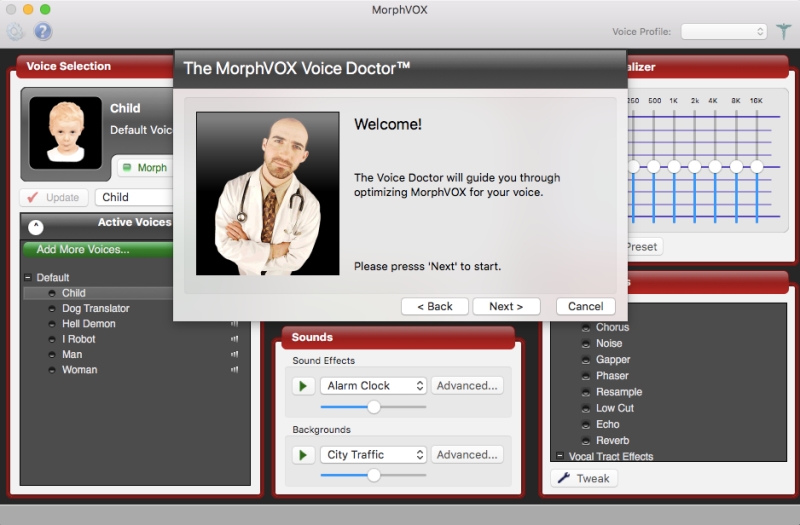
If you‘re looking for a reliable voice changer that works on both PC and Mac, MorphVox is another excellent cross-platform option. Like Voxal, it‘s a premium app with a higher price tag, but the depth of features and stellar performance are worth it for many users.
First, let‘s talk about the voice library. MorphVox has you covered whether you want to sound like a squeaky kid, a macho monster, or a sci-fi android. The app uses what it calls "voice skins" that simulate vocal tract resonances to make voices sound especially natural. For example, the "Orc Warlord" skin adds guttural snarls, while the "Nerd" creates a pinched nasal effect.
Streamers will appreciate the included background cancellation, which automatically removes unwanted ambient noise for the cleanest voice possible. You can also layer in your own custom sound effects and backgrounds, like a busy cafe or windy mountaintop — perfect for trolling friends who think you‘re actually taking that Zoom call from a ski lift.
MorphVox has you covered on the compatibility front, with support for all major VoIP platforms along with in-game chat for WoW, Fortnite, Among Us, League of Legends, and dozens more. It also works with audio/video editing tools like Audacity and Adobe Premiere for post-production vocal effects.
Key features:
- High-quality background cancellation for crystal clear vocals
- Add ambient background noises to change your virtual environment
- Customizable shortcuts and keystroke macros for quick voice swaps
- Impressive compatibility with games, chat platforms, and A/V software
- Unique vocal effects like stutter, "drunk," and radio distortion
- Create and save your own personalized voices with the voice editor
At $39.95 for a lifetime license, MorphVox is even pricier than Voxal. But if you‘re serious about finding a top-tier voice changer and aren‘t tied to a specific operating system, it‘s absolutely worth downloading the free trial to test it out. The level of features and audio fidelity are hard to beat.
Best of the Rest: Free and Web-Based Voice Changers
While the options above earned top marks in our testing, they aren‘t the only voice changers worth considering. Here are a couple more free and web-based options to try:
Clownfish Voice Changer (Windows): This free, open-source voice changer for Windows packs in a surprising number of features, including virtual surround sound, a text-to-speech generator, and the ability to create keyboard shortcuts for favorite voices. The interface looks a bit dated and the voice library isn‘t as extensive as premium options, but it‘s a great choice for gamers on a budget.
Voice Changer.io (Web-based): If you don‘t want to download any extra software, this web app lets you upload an audio clip or record yourself directly in the browser, then preview how you sound with various effects in real-time. With over 50 voices ranging from Darth Vader to "Fast Chipmunk," it‘s a fun way to experiment with vocal transformations. Just keep in mind you can‘t use it for real-time voice changing in games or calls.
Find Your Ideal Voice Changer
The perfect voice changer for you will depend on your specific needs and budget. Gamers who want the most immersive experience possible should opt for a real-time changer with a big sound library, like Voicemod or MorphVox. Content creators and musicians looking for the highest quality audio should invest in a premium option like Voxal.
Whichever software you choose, remember to use your new voice powers for good. While it can be tempting to troll strangers online, most voice changer fans stick to lighthearted pranks and playful character role-playing. With the ability to sound like anyone (or anything) you can imagine, the possibilities for creativity and fun are endless.

