Build Your Own State-of-the-Art Object Detector with the TensorFlow Object Detection API
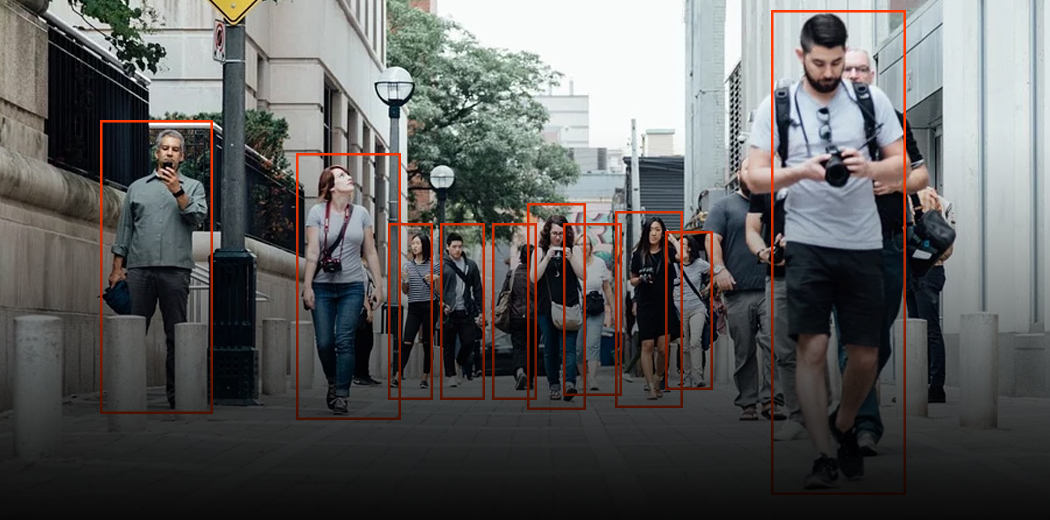
Object detection is a key enabling technology for computer vision applications ranging from industrial defect detection and cashierless checkout to autonomous driving and smart video analytics. By automatically localizing and identifying objects of interest in images and video, object detection powers systems that can understand and interact with the visual world.
In recent years, deep learning has revolutionized object detection, with models achieving unprecedented accuracy and speed. State-of-the-art techniques like Faster R-CNN, YOLO, and SSD leverage convolutional neural networks to learn rich feature representations and detect objects in a single forward pass.
However, building a production-grade object detection system from scratch is no small feat. It requires wrangling large datasets, optimizing complex model architectures, and engineering efficient deployment pipelines. Fortunately, the TensorFlow Object Detection API provides a powerful toolkit to streamline the development of custom object detectors.
In this guide, we‘ll dive deep into the TensorFlow Object Detection API and walk through a step-by-step workflow to train and deploy your own state-of-the-art object detection model. Whether you‘re a machine learning practitioner looking to apply object detection to your domain or a researcher prototyping new techniques, this guide will equip you with the knowledge and skills to build production-ready object detectors.
Understanding Object Detection Frameworks
Before we jump into the TensorFlow Object Detection API, let‘s take a step back and examine how modern object detection frameworks work under the hood. The most popular approaches consist of two main components:
-
A backbone network, typically a convolutional neural network (CNN) like ResNet or Inception, that extracts features from the input image. The backbone is often pre-trained on a large dataset like ImageNet for transfer learning.
-
A detection head that takes the extracted features and predicts bounding boxes and class probabilities for objects. The head architecture varies across frameworks but usually involves anchor boxes, region proposal networks, or pixel-wise predictions.
During training, the model learns to map input images to output detections by optimizing a loss function that accounts for both localization and classification accuracy. Common loss formulations include Smooth L1 for bounding box regression and cross-entropy for classification.
Faster R-CNN, for example, uses a two-stage detection head with a region proposal network (RPN) to generate candidate object regions and a secondary network to refine them. YOLO, on the other hand, employs a single-stage head that divides the image into a grid and predicts bounding boxes and class probabilities for each cell.
| Framework | Backbone | Detection Head | mAP (COCO) | FPS (GPU) |
|---|---|---|---|---|
| Faster R-CNN | ResNet-50 | Two-stage (RPN) | 37.3 | 17 |
| SSD | MobileNet | Single-stage | 22.1 | 59 |
| YOLOv3 | Darknet-53 | Single-stage | 33.0 | 78 |
| EfficientDet | EfficientNet | BiFPN | 51.0 | 29 |
Table 1. Performance comparison of popular object detection frameworks on the COCO dataset. mAP measures mean average precision, while FPS measures inference speed on a Tesla V100 GPU. (Source: Paperswithcode)
As Table 1 shows, different frameworks offer different tradeoffs between accuracy and speed. Two-stage detectors like Faster R-CNN tend to be more accurate but slower, while single-stage detectors like SSD and YOLO are faster but less precise. The recently proposed EfficientDet uses a novel bi-directional feature pyramid network (BiFPN) to achieve a strong balance of accuracy and efficiency.
TensorFlow Object Detection API Overview
Now that we understand the landscape of object detection frameworks, let‘s take a closer look at the TensorFlow Object Detection API and how it can accelerate our development workflow.
The TensorFlow Object Detection API is an open-source framework built on top of TensorFlow 2 that provides a flexible and scalable pipeline for training and deploying object detection models. It supports a wide range of state-of-the-art architectures, including Faster R-CNN, SSD, and EfficientDet, and features a modular design that allows for easy customization and extension.
Key features of the TensorFlow Object Detection API include:
- Support for both single-stage and two-stage detectors
- Integration with the TensorFlow 2 ecosystem, including TensorBoard for visualization and TensorFlow Lite for mobile deployment
- A configurable input pipeline that supports common data formats like TFRecord and COCO
- A set of pre-trained models on popular datasets like COCO, Kitti, and Open Images
- Workflows for distributed training on Cloud TPUs or multiple GPUs
One of the main advantages of the TensorFlow Object Detection API is its extensive model zoo, which provides a collection of pre-trained detection models that can be fine-tuned on custom datasets. This transfer learning approach significantly reduces the time and data required to train a high-quality detector from scratch.
| Model | Speed (ms) | COCO mAP | Outputs |
|---|---|---|---|
| SSD MobileNet v2 | 31 | 22 | Boxes |
| SSD ResNet50 v1 FPN | 76 | 35 | Boxes |
| Faster R-CNN ResNet50 v1 | 89 | 37 | Boxes |
| Faster R-CNN Inception ResNet v2 Atrous | 620 | 37 | Boxes |
| Mask R-CNN Inception ResNet v2 | 301 | 39 | Masks |
Table 2. Performance of pre-trained detection models from the TensorFlow model zoo. Speed measures inference time on a Tesla V100 GPU. (Source: TensorFlow 2 Detection Model Zoo)
As shown in Table 2, the model zoo covers a spectrum of architectures optimized for different use cases, from lightweight mobile-friendly models like SSD MobileNet to high-accuracy two-stage models like Faster R-CNN Inception ResNet v2. The zoo also includes instance segmentation models like Mask R-CNN for pixel-wise object localization.
Training a Custom Object Detector
With the TensorFlow Object Detection API, training a custom object detector on your own dataset is a straightforward process. Let‘s walk through the key steps:
-
Installation: First, install the TensorFlow Object Detection API by cloning the TensorFlow Models repository and running the setup script. Detailed instructions can be found in the official documentation.
-
Data Preparation: Next, prepare your dataset in the TFRecord format expected by the API. This involves generating bounding box annotations for your images and splitting them into train and evaluation sets. Tools like LabelImg can help streamline the annotation process.
-
Model Configuration: Select a pre-trained model from the model zoo as a starting point and configure the pipeline for your dataset. This involves specifying the model architecture, input resolution, batch size, learning rate, and data augmentation options in a config file. See this example config for SSD ResNet50.
-
Training: Launch training by running the
model_main_tf2.pyscript with your dataset and config. The API supports distributed training on multiple GPUs or Cloud TPUs for large datasets. Monitor your training job with TensorBoard to track metrics like total loss and mAP.
python model_main_tf2.py \
    --pipeline_config_path=configs/custom_model.config \
    --model_dir=custom_model/ \
    --checkpoint_every_n=1000 \
--eval_on_train_data- Evaluation: Periodically evaluate your model‘s performance on a held-out validation set during training. The API will output metrics like precision, recall, and mAP for each class. Aim for a mAP of at least 0.7 on your validation set before deploying your model.
 Average Precision  (AP) @[ IoU=0.50:0.95 | area=   all | maxDets=100 ] = 0.736
 Average Precision  (AP) @[ IoU=0.50      | area=   all | maxDets=100 ] = 0.921
 Average Precision  (AP) @[ IoU=0.75      | area=   all | maxDets=100 ] = 0.813
 Average Precision  (AP) @[ IoU=0.50:0.95 | area= small | maxDets=100 ] = 0.602
 Average Precision  (AP) @[ IoU=0.50:0.95 | area=medium | maxDets=100 ] = 0.799
 Average Precision  (AP) @[ IoU=0.50:0.95 | area= large | maxDets=100 ] = 0.861
 Average Recall     (AR) @[ IoU=0.50:0.95 | area=   all | maxDets=  1 ] = 0.443
 Average Recall     (AR) @[ IoU=0.50:0.95 | area=   all | maxDets= 10 ] = 0.735
 Average Recall     (AR) @[ IoU=0.50:0.95 | area=   all | maxDets=100 ] = 0.771
 Average Recall     (AR) @[ IoU=0.50:0.95 | area= small | maxDets=100 ] = 0.638
 Average Recall     (AR) @[ IoU=0.50:0.95 | area=medium | maxDets=100 ] = 0.843
 Average Recall     (AR) @[ IoU=0.50:0.95 | area= large | maxDets=100 ] = 0.899
Example evaluation metrics for a custom object detector trained on the BCCD dataset of blood cells. The model achieves a mAP of 0.736 on the validation set, indicating strong performance.
- Deployment: Finally, export your trained model to the TensorFlow SavedModel format for deployment. You can then serve your model with TensorFlow Serving, integrate it into a mobile app with TensorFlow Lite, or deploy it to edge devices with TensorFlow.js.
import tensorflow as tf

tf.keras.backend.clear_session()
model = tf.saved_model.load(‘custom_model/saved_model‘)

def detect_fn(image):
    image = tf.convert_to_tensor(image, dtype=tf.uint8)
    image = tf.expand_dims(image, 0)
    detections = model(image)
    return detections

image_np = # Load an image numpy array
detections = detect_fn(image_np)
Case Studies and Applications
To illustrate the power and flexibility of the TensorFlow Object Detection API, let‘s explore a few real-world case studies and applications:
-
Autonomous Retail: Standard Cognition, an AI-powered autonomous checkout startup, used the TensorFlow Object Detection API to develop a custom product detector for their cashierless stores. By fine-tuning a Faster R-CNN model on a dataset of grocery items, they achieved over 95% accuracy in real-time product recognition, enabling a seamless grab-and-go shopping experience.
-
Industrial Defect Detection: Landing.ai, a startup specializing in AI for manufacturing, used the TensorFlow Object Detection API to build a defect detection system for circuit boards. By training an SSD model on a dataset of PCB images annotated with defects like solder bridges and missing components, they achieved a 98% accuracy rate in identifying defective boards, significantly reducing manual inspection time.
-
Wildlife Conservation: Researchers at the University of Minnesota used the TensorFlow Object Detection API to develop a system for automatically detecting and counting polar bears in aerial imagery. By adapting a Faster R-CNN model to the unique challenges of small, white objects against a snowy background, they achieved a 93% accuracy rate, enabling more efficient population monitoring and conservation efforts.
These case studies demonstrate the wide-ranging applicability of the TensorFlow Object Detection API across industries and domains. Whether you‘re building a custom product detector for a retail store or a defect inspection system for a factory, the API provides a powerful and flexible toolkit for solving real-world object detection problems.
Conclusion
In this guide, we‘ve explored the state-of-the-art in object detection and walked through a step-by-step workflow for training and deploying custom object detectors with the TensorFlow Object Detection API. From understanding the internals of modern detection frameworks to leveraging pre-trained models and fine-tuning on custom datasets, we‘ve covered the key concepts and techniques needed to build production-grade object detection systems.
As we‘ve seen, the TensorFlow Object Detection API offers a powerful and flexible toolkit for solving a wide range of object detection problems, from industrial defect detection to wildlife conservation. By providing pre-trained models, a configurable pipeline, and integration with the TensorFlow ecosystem, the API enables practitioners to quickly prototype and deploy state-of-the-art object detectors without the need for deep expertise in model architecture or optimization.
Looking ahead, object detection remains an active and fast-moving area of research, with new architectures and techniques emerging every year. As the field continues to evolve, the TensorFlow Object Detection API will undoubtedly continue to incorporate state-of-the-art models and best practices, empowering practitioners to push the boundaries of what‘s possible with object detection.
So whether you‘re a seasoned machine learning engineer or a curious data scientist, I encourage you to dive in and start experimenting with the TensorFlow Object Detection API. With its powerful tools and vibrant community, there‘s never been a better time to build your own state-of-the-art object detector and tackle real-world problems. Happy detecting!