
How To Connect An Atari 2600 To A Modern HDTV – The Ultimate Guide
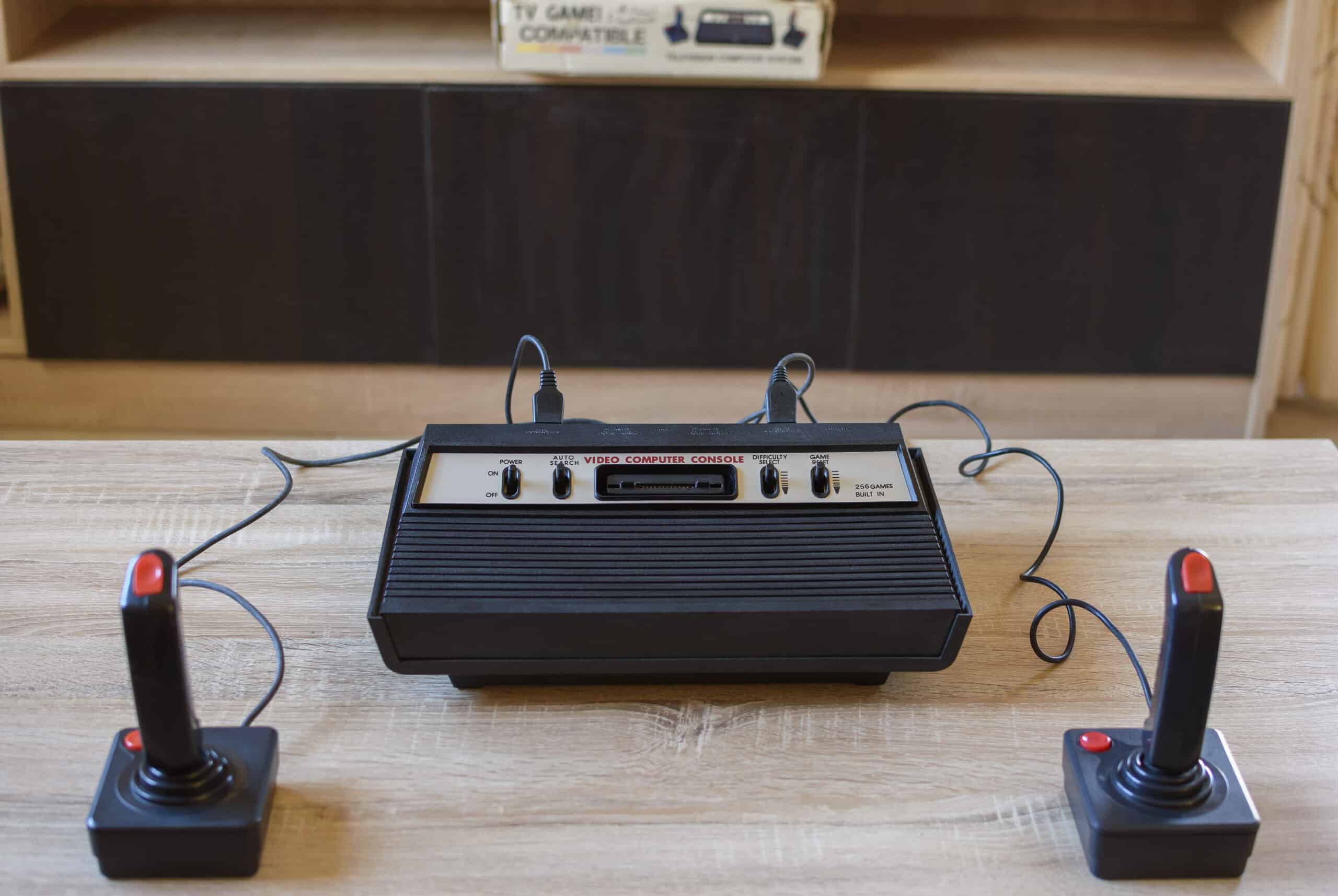
Got an old Atari 2600 gathering dust? Want to relive classic games like Pitfall, Combat, or Space Invaders on your modern big screen TV? I‘ve connected tons of classic consoles, and in this in-depth guide I‘ll show you exactly how to hook up your vintage Atari to a new HDMI-equipped television.
I‘m Loring Chien, an electronics expert and gaming enthusiast. Let‘s explore the Atari 2600‘s fascinating history, get hands-on with its analog audio/video technology, and make those classic games come alive on modern displays!
The Atari 2600 – Pioneer of Home Video Game Consoles
Before we open the hood, so to speak, let‘s appreciate where this trailblazing machine came from. The Atari 2600, originally called the Atari VCS (Video Computer System), debuted in 1977 and revolutionized home entertainment.
Atari co-founder Nolan Bushnell – often called the “father of video games” – wanted to bring the arcade experience into living rooms. ATARI engineer Jay Miner designed the iconic single-chip design that made the 2600 affordable and accessible.
The 2600 played host to many influential game franchises like Space Invaders, Asteroids, and Pac-Man. By 1982 it had sold 10 million units, cementing video games as a pop culture phenomenon.
Let‘s peek inside this piece of history and see what makes it tick!
Inside the Atari 2600 – RF and Composite Analog Outputs
The Atari 2600 is powered by a specialized 8-bit MOS Technology 6507 microprocessor clocked at just 1.19MHz. It outputs audio and composite video through an RF modulator and RCA jacks.
RF Output
For TV connections, the Atari 2600‘s RF modulator encodes the console‘s audio and video into an analog RF television channel signal. This is sent over a coaxial cable that screws into a TV‘s 300Ω antenna input.
The modulator converts signals to one of the UHF or VHF channels 3, 4, or 2 in Europe. Early consoles only have RF out.
Composite Outputs
Later 2600 models added RCA ports for video and stereo audio out. These separate signals offer better quality than combined RF:
- Video – Composite video signal carried on a single yellow RCA plug
- Audio Left/Right – Stereo audio sent over white/red RCA connectors
The video encoder chip generates an analog NTSC composite video signal. Max resolution is 160×192, with a 60Hz refresh rate.
Let‘s compare these analog outputs to today‘s digital HDMI connections.
Analog vs Digital – Key Differences from Modern HDMI
Modern HDTVs use all-digital connections like HDMI, while the Atari 2600 outputs analog signals. What does this mean?
Resolution
- The Atari 2600‘s maximum resolution is just 160×192 pixels. Even 720p HD is 1280×720 pixels – over 5 times higher resolution!
- Your HDTV likely supports 1920×1080 (1080p) or higher. This huge resolution difference requires upscaling the Atari‘s video.
Refresh Rate
- The 2600‘s NTSC output refreshes at 60Hz, while HDMI handles higher refresh rates like 120Hz or 240Hz. This can result in motion blurring during fast movement.
Audio Quality
- HDMI transports uncompressed digital multi-channel audio. The Atari 2600‘s mono or stereo audio outputs may suffer crosstalk and interference over RCA cables.
Connectors
- HDMI uses small digital ports. The Atari 2600‘s analog outputs use coaxial RF, RCA, etc requiring bulky interface hardware.
In summary, converting the Atari 2600‘s legacy analog signals to work with a modern digital TV requires overcoming resolution, refresh, audio, and connector differences. But with the right equipment, we can make it happen!
Recommended Equipment for Connecting the Atari 2600 to an HDTV
To bridge the analog-to-digital divide, you‘ll need:
- Interface to convert analog signals to HDMI
- Cables to send signals from the Atari 2600 to the interface
Let‘s explore some interface options and appropriate cables:
RF to HDMI Converter
- Input: Coaxial RF
- Output: HDMI
- Cost: $20-50
Simple and inexpensive but can introduce noise and interference.
RCA Composite to HDMI Converter
- Input: Composite RCA video + R/W RCA audio
- Output: HDMI
- Cost: $30-100
Provides cleaner audio and video than RF conversion. Requires RCA cables.
Upscaler
- Input: RCA Composite
- Output: HDMI 720p/1080p upscaled
- Cost: $80-250
In addition to conversion, upscalers process the signal and output higher HD resolutions. Video quality improves but lag may increase.
Cables
- Coaxial RF cable: Connects RF out to RF converter
- RCA Composite cable set: Connects RCA outputs to a composite converter.
Gold-tipped or shielded cables can help maintain signal integrity.
Let‘s walk through how to use these components to hook up your Atari 2600.
Step-by-Step Guide to Connecting the Atari 2600 to an HDTV
Follow these steps to connect your Atari 2600 to a modern HDTV:
- Turn off your Atari 2600 and HDTV. Safety first!
- Connect Atari 2600 to chosen interface using appropriate cables:
- RF Out: Attach coaxial RF cable
- RCA Out: Connect RCA composite cable
Verify cables are firmly seated.
- Connect interface HDMI output to an open HDMI port on your TV.
- Turn on your TV and select the HDMI input connected to your Atari 2600 interface.
- Power on the Atari 2600. You should see the familiar Atari logo if connected properly!
- Fine tune display settings:
- Adjust aspect ratio to match the Atari 2600‘s 4:3 output.
- Enable Game Mode to reduce display processing lag.
- Connect controllers to console ports and enjoy your favorite classic games!
Optimizing Display Quality and Minimizing Lag
Picture quality and controller responsiveness are important to enjoyable retro gaming. Here are some tips for optimization:
Display Settings
- Game Mode minimizes display processing that adds lag. Turn off unnecessary video processing.
- Match the Atari 2600‘s 4:3 aspect ratio to avoid image stretching. Pillarboxing adds side bars if needed.
- Adjust brightness, contrast, and sharpness carefully. The Atari 2600‘s lo-fi graphics can be unforgiving.
HDMI Adapters
- Simple converters add minimal lag. Upscalers improve video quality but may impact response times.
- Try different adapters and HDMI inputs to find the combo with lowest latency.
Controllers
- Plug controllers directly into Atari 2600 ports, not the TV, for minimum input lag.
- Sit close to the TV to reduce the feeling of display latency. Wireless controllers allow flexible positioning.
With some experimentation, you can achieve great picture quality and responsive controls – just like playing on an old CRT television!
Enhancing Gameplay with Wireless Controllers
The Atari 2600‘s iconic paddle and joystick controllers feature short cord lengths that limit where you can sit. Wireless controllers are a great way to enhance your Atari 2600 experience:
Bluetooth Controllers
- Require a Bluetooth adapter connected to the Atari 2600
- Allow wireless use of PS4, Xbox, and other modern controllers
2.4GHz Wireless Controllers
- Use a USB wireless receiver plugged into the Atari 2600
- Optimized for minimal latency
Wireless Controllers with Built-In Receivers
- No adapter needed
- Wireless receiver is inside the controller
- Plug and play operation
I recommend the Hyperkin Trooper wireless controller. It feels like an original 2600 joystick but cuts the cord for only $20!
Breakdown of Different Atari 2600 Models and Revisions
The Atari 2600 underwent several hardware revisions during its long production run from 1977-1992:
Atari 2600 (1977 launch)
- Woodgrain styling
- RF output only
- Six circular switch controller ports
- Integrated metal switches and knobs
Atari 2600 (1980 revision)
- Black “Darth Vader” styling
- RF + RCA composite outputs added
- Molded black plastic switches/controller ports
Atari 2600 Jr. (1986 re-release)
- Smaller cost-reduced design
- Plastic construction mimics 7800 model
- Same RF + RCA output options
- Only 2 controller ports
Atari 2600 Goldstar (South Korea model)
- Identical to the 2600 Jr. but with gold color scheme
- RF and RCA outputs
- Official licensed model only sold in South Korea
All these models connect similarly. The original 1977 woodgrain model requires an RF converter, while later editions can use RCA cables.
The Atari 2600‘s Legendary and Influential Game Library
Now let‘s explore some of the iconic and influential games that make the Atari 2600 such a treasured piece of history. These revolutionary titles established concepts we take for granted in modern games:
Space Invaders (1978)
- Landmark home port of the hit arcade game
- Established shooting game genre
- Copy sold over 1 million copies
Adventure (1979)
- First action-adventure game with rooms to explore
- Foreshadowed Legend of Zelda, Metroid
Pitfall! (1982)
- Open world 2D side scroller
- Detailed animations set new quality bar
- Inspired seminal Super Mario Bros 2D gameplay
Yars‘ Revenge (1982)
- Best selling original Atari 2600 game (over 1 million copies)
- Demonstrated Atari 2600 technical capabilities
- Still a fan favorite today
This just scratches the surface of the Atari 2600‘s expansive library. Nearly 1000 games were released spanning multiple genres and innovations.
Rarest and Most Valuable Atari 2600 Consoles and Games
While common Atari 2600 consoles and games are inexpensive to acquire, some ultra-rare items can fetch huge prices from collectors:
Atari Cosmos (Prototype, 1981)
- Unique holographic game system
- Used special holographic cartridges
- Only 2 prototypes are known to exist
- Sold for over $15,000 at auction
Gamma Attack (1983)
- European exclusive title, with only a few hundred sold
- Simple Tron-inspired graphics
- A sealed copy sold for $10,000 in 2010
Red Sea Crossing (1983)
- Based on Biblical story of Moses parting Red Sea
- Sold only through magazine ads
- Only 2 confirmed copies, 1 sold for $10,000+
Condition, rarity, and collector demand determine values. Common games are inexpensive, while “holy grail” items can fetch five or six figure prices!
Recommendations for Collecting and Maintaining the Atari 2600
Here are my tips for properly caring for your vintage Atari 2600 as a collector:
- Carefully clean cartridge edge pins to remove corrosion and improve connections. Isopropyl alcohol works great.
- Open up consoles every few years and clear out accumulated dust using compressed air. Avoid moisture buildup.
- Replace aging power supplies to avoid voltage spikes or power issues that could damage consoles and cartridges.
- Properly store games in protective cases away from moisture, sunlight, and temperature extremes that accelerate wear.
- Leave original warning stickers, packaging material, paperwork, etc intact to preserve complete condition.
- Research reputable grading companies like Wata Games to properly assess and authenticate rare finds. Grading helps establish provenance and condition factors that set collectible values.
Your Atari 2600 console and games should provide decades of enjoyment with common sense care and maintenance!
Step-by-Step Troubleshooting for Atari 2600 Connectivity Issues
If you see a blank screen or hear no audio after hooking up your Atari 2600, don‘t panic! Here is my methodical troubleshooting approach:
- Double check all connectors are firmly seated. Loose cables are a frequent culprit.
- Try connecting the Atari 2600 to a different TV or input, isolate the issue source.
- Verify TV input settings match the port you connected the Atari 2600 through. Select correct video input.
- Test multiple games – dirty/worn cartridge pins can cause issues reading games.
- Inspect pins on game cartridges. Clean any corrosion or oxidation with isopropyl alcohol on a cotton swab.
- Examine connectors on the Atari 2600 itself. Clean any built-up grime or oxidation on the pins.
- Replace any old cables or adapters with known good ones. Faulty converted can cause problems.
- For continued issues, consider replacing the Atari 2600 power supply. Age degrades voltage regulation.
Methodically eliminate potential points of failure until you narrow down and isolate the exact problem cause. With patience you can get your vintage Atari back up and running.
Rediscover Timeless Classics with the Atari 2600
I hope this deep dive empowers you to resurrect your classic Atari 2600 console on a shiny new television. It‘s rewarding to preserve retro gaming history and re-experience these foundational titles decades later.
Whether you grew up with an Atari 2600 or are discovering it for the first time, this guide removes the obstacles and gets those iconic games displayed properly on modern TVs. The joys of Pitfall, River Raid, Kaboom and Combat await!
So pick up those legendary woodgrain joysticks, grab some snacks, and let your imagination carry you away to a golden age of gaming. Game on!
