
The Ultimate Guide to Create a Caricature with insMind Free Online Caricature Maker

As we know, caricatures are the exaggerated representations of individuals that are portrayed in a humorous or satirical way. Using this approach, content creators can easily transform ordinary images into interactive and distinctive versions.
Hence, whether you desire to boost your ranking on social media platforms or want to create captivating portraits, this guide covers the best caricature maker, insMind. Thus, explore the details to unravel the possibility of art generation with this AI-powered tool.
Part 1. Unleash Your Creativity with insMind Caricature Maker
insMind caricature maker is a fast, easy-to-use, and free online tool that allows you to transform your ideas into compelling art. Using this tool, one can prompt AI to generate caricatures of individuals based on description. Other than text, its AI can transform ordinary selfies into classic caricatures to enhance the visual appeal of images.
Furthermore, this AI tool supports various styles, from anime to 3D and Van Gogh, offering you the versatility to choose the style that suits your preferences. From wedding caricatures to anime, you can add a personalized touch to your images with this caricature online maker.
Part 2. How to Create Caricatures with insMind: A Complete Guide
After focusing on this incredible caricature-maker feature of insMind, you probably want to try this AI tool in both personal and business contexts. We've included a step-by-step guide below that will help you showcase your creativity and art in a unique style.
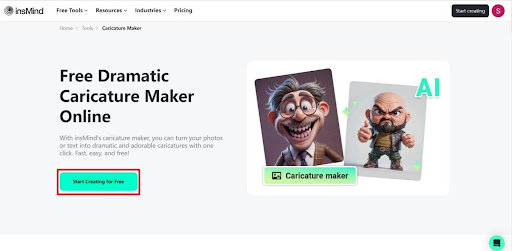
Step 1. Launch the Main page and Upload Your Image
After entering the Caricature Maker tool page from insMind's website, press the “Start Creating for Free” button to create an engaging caricature.
Step 2. Make Caricature by Sending Description Through Its AI
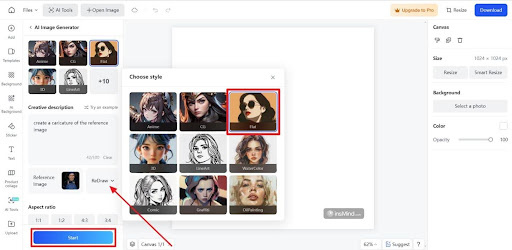
Next, write a proper description in the AI chat box on the left side of your screen. You can also add a reference image to create a clearer caricature that fulfills your requirements successfully.

Step 3. Select Caricature Style and Adjust Image Control Model
Moving forward, select a different style for your caricature from the available AI-generated style options. To make your caricature stand out, you can also choose a specific “Image Control Model” from the options provided. Finally, hit the “Start” button to generate your instructed caricature after finalizing all the settings.
Step 4. Download Your Generated Caricature Image
After generating an AI caricature, head to the “Download” button at the right corner of your interface. Then, select the image quality and format you require to download your final caricature image. Finally, press the “Download” button and save the image to your device.

Part 3. Exploring the Advantages of insMind's Caricature Tool
As you are already aware now, caricature art is an essential component of artistic expression since it has a strong visual impact that grabs viewers' attention. Therefore, let us now explore more advantages when using insMind to make caricature from photos.
- Different Styles:When making caricature images through insMind, it provides users with unlimited style options from Anime to Watercolor and CG, never failing to enhance your outlook.
- Speed and Efficiency:With its automated process and built-in controls, the caricature tool instantly reduces the time required to create art, making it an ideal choice for professionals.
- Advanced AI Assistance:insMind caricature maker attributes most advanced AI algorithms among the other similar tools, ensuring the delivery with carefully crafted minor details.
- Customization Options:Users can customize various body features, including the facial expressions and hair styles, by prompting AI to create personalized caricatures.
Part 4. Discovering New AI Possibilities with insMind
Apart from insMind being an amazing caricature maker, there is a lot professional users can achieve using this high-quality editing software. Following are some exceptional features that will raise your editing skills to another level:
Face Swap: Make your imaginative models come to life with its AI face swap capability by just providing a reference image and letting the tool work its magic. Moreover, insMind makes the results more realistic and attractive by allowing users to swap faces between different genders.
AI Thumbnail Maker: insMind offers an innovative AI design tool that helps you generate stunning thumbnails in just a few clicks and turns your ideas into eye-catching visuals. For creating attractive thumbnails, this tool provides numerous templates to choose from and make your brand stand out.
Color Picker from Image: With the insMind color picker feature, you can get the exact color you need from an image by simply uploading it and letting the tool do the rest. Without any need for advanced skill, you can effortlessly create your color palette by extracting color from any image.
Photo to Line Drawing: The insMind line art filter can create stunning art in any orientation while delivering consistent quality and versatility for all your creative projects. Moreover, it provides various AI filters other than LineArt to fulfill your artistic needs.
Conclusion
In conclusion, insMind's phenomenal caricature-maker tool not only simplifies the caricature-making process but also boosts overall creativity. For users who need to improve their artistic skills, this tool can serve as a learning source while offering insights into caricature techniques and styles. Therefore, it is suggested that users should use insMind, as it enables users to think outside the box and experience different styles.


