Harnessing the Power of Microsoft Azure Cognitive Services for AI Development
As artificial intelligence continues its rapid advancement, more and more developers are looking to incorporate AI capabilities into their applications. However, building sophisticated AI models from scratch requires significant expertise, time, and computing resources that many teams simply don‘t have.
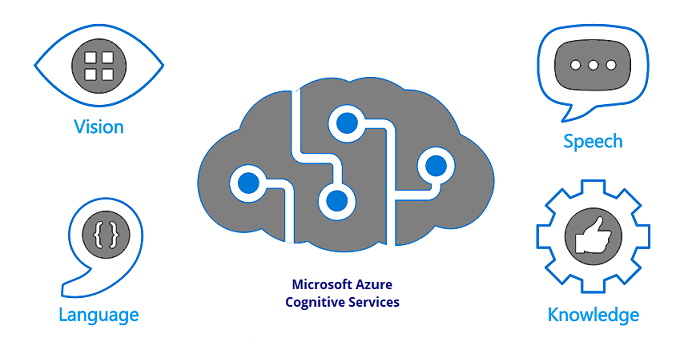
This is where Microsoft Azure Cognitive Services comes in. Azure Cognitive Services provides developers with a suite of powerful, pre-trained AI models that can be easily integrated into applications through simple REST APIs. Whether you need computer vision, speech recognition, natural language processing, or decision support, Azure Cognitive Services has an API for it.
In this article, we‘ll take a deep dive into one of the most popular Azure Cognitive Services APIs – the Computer Vision API. We‘ll explore what it‘s capable of, how to get started using it, and see code examples of it in action. By the end, you‘ll have a solid understanding of how Azure Cognitive Services can accelerate your AI development.
Introducing Azure Computer Vision API
The Computer Vision API is a cloud-based service that provides advanced algorithms for processing and analyzing images. With a single API call, you can extract a wealth of information from an image, such as:
- Identifying objects, people, text, scenes, and activities
- Generating descriptions and tags
- Detecting faces and emotions
- Recognizing celebrities and landmarks
- Extracting text using optical character recognition (OCR)
- Analyzing image types and color schemes
- Detecting explicit or suggestive content
- And much more
What‘s incredible is that you get access to all these capabilities without having to build complex computer vision models yourself. Microsoft has done the hard work of collecting massive datasets, designing architectures, and training the models. You simply send your images to the API and get structured insights in response.
This enables all kinds of powerful scenarios like:
- Analyzing user-generated images in social media apps
- Enabling visual search and product recommendations in e-commerce
- Extracting business insights from scanned documents and receipts
- Moderating user content and profiles in online communities
- Describing images for accessibility in apps for the visually impaired
- And countless other applications limited only by your creativity
So how do you get started? Let‘s walk through the process step-by-step.
Setting Up Azure Cognitive Services
To use any of the Azure Cognitive Services APIs, you first need an Azure account. If you don‘t already have one, you can sign up for a free account that comes with a $200 credit for the first 30 days.
Once you have an account, log into the Azure Portal and create a new Cognitive Services resource:
- Click "Create a resource" and search for Cognitive Services
- Select the Cognitive Services offering and click Create
- Choose a name for your resource, select a region, and pick an appropriate pricing tier for your needs
- Fill in the rest of the fields and click Create
Once the resource finishes deploying, you‘ll need to grab a few key pieces of information:
- The endpoint URL for the specific Cognitive Service API you want to use (in this case, Computer Vision)
- One of the two keys generated for authenticating your API calls
With that, you‘re ready to start using the Computer Vision API from your code! Let‘s look at an example.
Analyzing Images with the Computer Vision API
Here‘s a Python snippet that demonstrates the core flow of using the Computer Vision API to analyze an image from a URL:
import requests

# Replace with your own Cognitive Services key and endpoint
subscription_key = "YOUR_SUBSCRIPTION_KEY"
endpoint = "YOUR_ENDPOINT/vision/v3.1/analyze"

# Image URL to analyze
image_url = "https://example.com/image.jpg"

# Construct the API request
headers = {
    "Ocp-Apim-Subscription-Key": subscription_key,
    "Content-Type": "application/json"
}
params = {
    "visualFeatures": "Categories,Description,Objects",
    "language": "en"
}
data = {"url": image_url}

# Call the API
response = requests.post(endpoint, headers=headers, params=params, json=data)

# Print the JSON results
print(response.json())
Let‘s break this down:
- We start by configuring our Cognitive Services subscription key and API endpoint URL
- We specify the URL of the image we want to analyze
- We construct the HTTP request headers and parameters
- The
Ocp-Apim-Subscription-Keyheader passes our key for authentication - The
Content-Typeheader indicates we‘re passing a URL in the request body - The
visualFeaturesparameter specifies which insights we want the API to extract - The
languageparameter specifies the language for the returned insights
- The
- We make the HTTP POST request to the API endpoint, passing the URL in the body
- We print out the JSON response from the API
The JSON response contains a wealth of structured data about the image, including:
- The identified categories and confidence scores
- A generated description of the image
- A list of tags related to the image contents
- Bounding box coordinates and confidence scores for each detected object
- And additional insights based on the visual features we requested
You can integrate this kind of analysis into your application backend, trigger it in response to user actions or system events, and present the extracted insights to users or pipe it to other services. And again, you get all of this without having to develop your own computer vision models!
Benefits of Using Cognitive Services APIs
At this point, you might be thinking – this is great, but why don‘t I just build my own computer vision models customized to my specific application and data? While that‘s certainly an option, there are several compelling benefits to leveraging pre-built APIs like those offered by Azure Cognitive Services:
-
Time to market – Developing production-grade, highly accurate AI models is a time-intensive process. By using pre-built APIs, you can add AI capabilities to your application in a fraction of the time.
-
Reduced development cost – Collecting high-quality training data, experimenting with model architectures, and training at scale requires significant compute resources and specialized AI expertise. Cognitive Services APIs reduce your upfront and ongoing development costs.
-
Scalability and performance – Cognitive Services APIs run on Azure‘s global, high-performance infrastructure and can scale seamlessly as your application traffic grows. You don‘t have to worry about provisioning and maintaining your own inference infrastructure.
-
Continuous improvement – Microsoft is continually improving the accuracy and capabilities of the Cognitive Services APIs, and those improvements are automatically rolled out to users. Your application benefits from the latest advances without any changes to your code.
-
Simplified integration – Cognitive Services exposes simple REST interfaces that can be called from any programming language or framework that supports HTTP requests. You don‘t have to worry about the complexities of model deployment, versioning, and compatibility.
That said, the pre-built APIs may not always match the specific requirements of your application. In those cases, Azure provides additional options like Custom Vision Service that lets you train custom computer vision models on your own data while still taking advantage of the Azure AI development ecosystem.
Exploring Other Azure Cognitive Services
While we‘ve focused on the Computer Vision API in this article, it‘s just one of the many APIs available in Azure Cognitive Services. Here‘s a quick overview of some of the other popular offerings:
- Face API – Detect, identify, analyze, organize, and tag faces in images
- Speech Services – Convert speech to text, synthesize text to speech, translate speech, and identify speakers
- Language Understanding (LUIS) – Build natural language understanding into apps, bots, and IoT devices
- Text Analytics – Extract key phrases, detect sentiment and languages, and recognize linked entities in text documents
- Personalizer – Deliver rich, personalized experiences for every user
Each of these APIs follows a similar usage pattern to what we saw with the Computer Vision API – you make HTTP requests to the service endpoint with your data and receive structured insights in the response. This consistency makes it easy to combine multiple cognitive capabilities into your applications.
Best Practices for Using Cognitive Services APIs
To wrap up, let‘s review some best practices to keep in mind as you integrate Azure Cognitive Services into your applications:
-
Handle failures gracefully – Like any external service, Cognitive Services APIs can experience transient failures or outages. Make sure your application code handles errors and retries appropriately.
-
Manage your subscription quotas – Each Cognitive Services resource has usage limits and quotas based on your selected pricing tier. Monitor your usage to avoid unexpected throttling or overages. Consider implementing logic to fall back to a basic experience if the API calls fail.
-
Protect user privacy – When sending user data to Cognitive Services, take appropriate measures to protect user privacy, such as obtaining necessary consents, anonymizing personal information, and following security best practices for data in transit and at rest.
-
Provide feedback channels – The accuracy and utility of Cognitive Services APIs can vary based on your specific application scenario and data. Provide channels for your users to report inaccuracies or suggest improvements, and use that feedback to evaluate if a custom model would better suit your needs.
-
Stay up to date – Azure Cognitive Services is a continuously evolving platform. Keep an eye out for service updates, new API versions, and additional capabilities that could benefit your application.
The Future of AI Development on Azure
As impressive as the current slate of Azure Cognitive Services APIs is, it‘s only the beginning of what‘s possible with AI development on Azure. Microsoft continues to invest heavily in AI research and development, and we can expect to see a steady stream of new Cognitive Services offerings and enhancements in the years to come.
Some key areas to watch:
- Continued breakthroughs in core AI domains like computer vision, natural language processing, and speech recognition that will expand what‘s possible with Cognitive Services
- Deeper integration of Cognitive Services with other Azure services like Azure Machine Learning and Azure Functions to support end-to-end AI workflows
- More granular and flexible customization options to tailor Cognitive Services models to specific industries and use cases
- Tighter integration with Azure‘s responsible AI tools to help developers build AI systems aligned with ethical principles and values
Ultimately, the goal of Azure Cognitive Services is to democratize AI and make it accessible to every developer and every organization. By providing high-quality, pre-built AI models as scalable APIs, it empowers developers to focus on the creative and differentiating aspects of their applications while still leveraging state-of-the-art AI capabilities.
If you‘re not already using Azure Cognitive Services, we encourage you to dive in and start experimenting. With generous free quotas and a continually expanding set of APIs, it‘s never been easier to get started with AI development and add intelligent features to your applications.
![How To Troubleshoot Claude AI Failing On Chrome Browser [2026 Expert Guide]](https://33rdsquare.com/wp-content/uploads/2024/03/20240312074049-65f0070179308.png.webp)