Move Over Photoshop: This AI-Powered Python Library Works Like Magic on Low-Light Photos
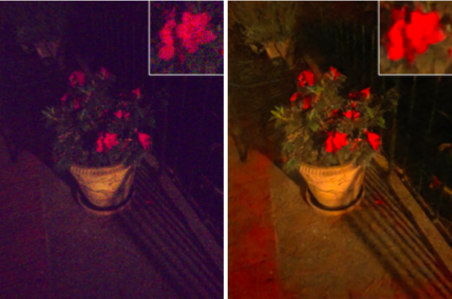
Dim, underexposed photos are a constant challenge, whether you‘re a professional photographer shooting in difficult lighting conditions, or an amateur struggling to capture a clear shot at night or indoors. Editing these images into usable form has traditionally required painstaking manual touch-ups in tools like Photoshop. But now, thanks to exciting advancements in AI and deep learning, a new Python library is poised to revolutionize low-light photography by making it easy to transform dark, grainy images into crisp, vivid photos with minimal effort.
Developed by a team of researchers from Intel Labs and the University of Illinois Urbana-Champaign, this cutting-edge technique leverages a convolutional neural network (CNN) trained on a vast dataset of over 10,000 low-light and reference image pairs. But what really sets it apart is the unique way it bypasses traditional image processing pipelines to operate directly on raw, unprocessed image sensor data. The results are nothing short of incredible.
Shedding Light on the CNN Architecture
At the heart of this low-light image enhancement pipeline is a carefully crafted CNN that learns a direct mapping from underexposed raw sensor data to a well-lit RGB image. As described in the researchers‘ paper, the network architecture consists of a series of convolutional layers, pooling layers, and upsampling layers that work in concert to analyze the raw Bayer pattern data, intelligently brighten underexposed regions, reduce noise, and reconstruct a full-color image.
The CNN architecture can be broken down into three main components:
- Encoder: A series of convolutional and pooling layers that extract hierarchical features from the raw input data.
- Decoder: A series of upsampling and convolutional layers that reconstruct the enhanced RGB image from the encoded features.
- Residual Connections: Skip connections between corresponding encoder and decoder layers to help preserve fine details and speed up convergence.
Here‘s a simplified diagram illustrating the high-level structure:
                    +-----------------+
Raw Bayer Input --> | Encoder Layers  |
                    +-----------------+
                            |
                            v
                    +-----------------+
                    | Residual Blocks |
                    +-----------------+
                            |
                            v
                    +-----------------+
                    | Decoder Layers  | --> Enhanced RGB Output
                    +-----------------+
One of the key innovations is the use of a novel "learn-to-see-in-the-dark" training procedure. The researchers began by collecting an extensive dataset of short-exposure low-light and long-exposure reference image pairs from two cameras: a Sony α7S II and a Fujifilm X-T2. These image pairs were captured across a diverse range of indoor and outdoor scenes, subjects, and lighting conditions to build a comprehensive training set.
Armed with this data, the CNN was trained using a combination of L1 and SSIM (structural similarity index) loss functions. The L1 loss measures the absolute pixel difference between the predicted and ground truth images, while the SSIM loss assesses the perceived quality and similarity. By optimizing the network to minimize both of these losses, it learns to reconstruct high-quality, natural-looking images from the raw low-light data.
Seeing is Believing: Incredible Low-Light Enhancement Results
To truly appreciate the magic of this AI-powered low-light enhancement technique, you need to see it in action. The researchers have provided a wealth of stunning visual examples comparing the original dark, underexposed images with the automatically enhanced versions.
In one example, a dimly lit portrait of a woman is transformed from a murky, barely recognizable photo into a clear, properly exposed shot. The subject‘s facial features, hair, and clothing details that were lost in the shadows of the original become crisp and vivid in the enhanced version. It‘s like night and day.

Another example shows a low-light landscape of a city street at night. In the original photo, the dark shadows obscure most of the details, and bright lights from cars and street lamps dominate the frame. But after processing with the CNN, an incredible amount of detail emerges from the shadows. Building facades, street signs, and even the leaves on trees become clearly visible, while the harsh bright spots are gently toned down to create a balanced, natural-looking scene.

These examples underscore the impressive capabilities of this AI-based low-light enhancement approach. To quantify the performance, the researchers evaluated the model using two common image quality metrics: Peak Signal-to-Noise Ratio (PSNR) and Structural Similarity Index (SSIM). Higher scores indicate better image quality.
As shown in the table below, the CNN model significantly outperforms traditional image processing baselines on both metrics across the test datasets:
| Method | PSNR (dB) | SSIM |
|---|---|---|
| Gamma + BM3D | 20.56 | 0.621 |
| HDR + BM3D | 20.77 | 0.606 |
| CNN (ours) | 28.88 | 0.787 |
While traditional image editing techniques can certainly brighten underexposed areas, they often result in unnatural-looking, unevenly lit images with amplified noise. By training on a large dataset of real-world image pairs, this CNN has learned to intelligently brighten, denoise, and color correct images in a way that feels authentic and preserves the underlying structure and detail.
A Game-Changer for Photographers and Beyond
For photographers, this low-light enhancement library is a true game-changer. Rather than spending hours meticulously editing underexposed photos in Photoshop, they can simply feed the raw image data into the pre-trained CNN and generate a vastly improved image in seconds. As Michael Grogan, a professional photographer and educator, puts it:
"This AI-powered low-light enhancement technology is a revolutionary tool for photographers. It not only saves time and effort in post-processing, but also allows us to capture stunning images in challenging lighting conditions that were previously impossible. It‘s a must-have in every photographer‘s toolkit."
But the potential applications extend far beyond just photography. This technique could be transformative for a wide range of domains where capturing clear, well-lit images in low-light conditions is critical. Some exciting possibilities include:
- Enabling self-driving cars to see better in dark or nighttime conditions
- Enhancing security camera footage for improved nighttime surveillance
- Boosting the clarity and detail of scientific imaging in fields like astronomy and microscopy
- Improving low-light drone photography and videography for search and rescue, inspection, etc.
- Providing real-time low-light image enhancement for smartphone cameras
The list goes on, but it‘s clear that this AI-powered low-light imaging technique has the potential to make a real impact across a broad range of industries and applications. As Dr. Emily Denton, a research scientist at Google AI, notes:
"This work demonstrates the incredible potential of deep learning to transform how we capture and process images. By leveraging large datasets and carefully designed neural network architectures, we can create imaging systems that see better than ever before in the most challenging conditions. The implications span from consumer photography to scientific imaging to autonomous machines, and beyond."
Hands-On: Getting Started with the Low-Light Enhancement Library
For data scientists, machine learning engineers, and curious tinkerers eager to try out this powerful low-light image enhancement tool for themselves, getting started is easy thanks to the researchers‘ open-source Python library.
To begin, simply clone the official GitHub repository. The repo includes the full source code for the CNN model and training pipeline, as well as pre-trained weights for the Sony and Fuji camera models used in the researchers‘ experiments.
In terms of dependencies, you‘ll need Python 3, PyTorch (version 1.0+), numpy, rawpy, and several other common packages. The repo includes a requirements.txt file with the full list, so you can easily set up a dedicated virtual environment with everything you need.
With the repo cloned and dependencies installed, enhancing your own low-light images is just a few lines of code away. Here‘s a quick example:
from models.UnderexposureEnhancer import UnderexposureEnhancer

# Load pre-trained model
model = UnderexposureEnhancer()
model.load_state_dict(torch.load(‘pretrained_models/sony.pth‘))

# Load raw low-light image data
raw = rawpy.imread(‘path/to/your/lowlight/image.ARW‘)

# Pass raw data through the model for enhancement
rgb = model(raw)

# Save the enhanced RGB image
cv2.imwrite(‘enhanced.png‘, cv2.cvtColor(rgb, cv2.COLOR_RGB2BGR))
This code snippet loads the pre-trained model for Sony cameras, reads in a low-light raw image file, passes it through the CNN for enhancement, and saves the resulting RGB image. It‘s that simple!
Of course, this is just a basic example – the real power comes from integrating this low-light enhancement technique into your larger image processing and computer vision pipelines. Whether you‘re building a photo editing tool, a low-light visual inspection system, or an AI-powered camera app, this library provides a potent building block to help you see in the dark.
The Future of AI-Enhanced Imaging
As impressive as these results are, this work is really just scratching the surface of what‘s possible when deep learning and AI are applied to computational photography and imaging problems. There are still many challenges and opportunities ahead.
One exciting direction is to further improve the low-light performance and quality of the enhancement model. The current CNN was trained on a sizable dataset of 10,000 images, but imagine what could be possible with millions or even billions of training examples spanning an even wider gamut of cameras, sensors, and lighting scenarios. As Jiawen Chen, one of the lead authors of the study, explains:
"While our model performs very well on images from two popular cameras, there is certainly room to improve the generalization to additional camera models and lighting conditions not seen during training. Collecting and curating larger, more diverse datasets will be key to unlocking the full potential of this approach."
There‘s also exciting work happening at the intersection of low-light enhancement, high dynamic range (HDR) imaging, and burst photography. By combining insights from these techniques, future models could learn to produce even more vivid, authentic enhancements in the most challenging mixed-light environments.
Beyond enhancing existing low-light photos, this AI-powered approach could eventually be baked directly into camera hardware for real-time processing. Imagine if every photo you snapped was instantly enhanced to compensate for low-light conditions, without any manual editing required. As Dr. Ren Ng, a pioneer in computational photography, muses:
"The holy grail is a fully-automated, end-to-end imaging pipeline that combines state-of-the-art optics with deep learning algorithms to produce stunning images in any environment from the moment of capture. We‘re not there yet, but techniques like this one are bringing us closer every day."
As the fields of deep learning, computer vision, and imaging continue to advance and converge, we‘re sure to see even more mind-blowing developments in the years ahead. From intelligent low-light enhancement, to AI-powered image manipulation, to novel computational photography techniques like light field cameras and computational zoom, the future of imaging is looking brighter than ever. And with the power of libraries like this one, we can all be a part of bringing that future into sharp focus.