Seaborn Library: Your Powerful Ally for AI and Machine Learning Visualization

As an artificial intelligence and machine learning expert, you know that visualization is a crucial part of the data science workflow. Exploring and understanding complex, high-dimensional datasets is essential for building effective models and communicating results to stakeholders. That‘s where Seaborn comes in – a powerful Python library for statistical data visualization that is a valuable ally for any AI/ML practitioner.
In this in-depth guide, we‘ll explore what makes Seaborn uniquely suited for AI and machine learning visualization and walk through key features and techniques. Whether you‘re a seasoned data scientist or just starting your journey in AI/ML, Seaborn will help you gain insights faster and tell a compelling story with your data. Let‘s dive in!
Seaborn‘s Role in the Python Data Science Ecosystem
Seaborn is part of the rich ecosystem of open source Python libraries for data science and machine learning. It is built on top of matplotlib, the foundational plotting library in Python, and is designed to work seamlessly with Pandas DataFrames, the go-to data structure for data analysis.

Source: Jake VanderPlas, "Python Data Science Handbook" (O‘Reilly Media)
In a typical machine learning workflow, you might use:
- NumPy for numerical computing
- Pandas for data manipulation and analysis
- Matplotlib for basic plotting
- Scikit-learn for machine learning models
- And Seaborn for statistical data visualization
Seaborn elevates the default matplotlib plots with more attractive visual aesthetics and adds advanced statistical functions. While you can certainly create plots with matplotlib alone, Seaborn makes it much quicker and easier to create informative plots that are ready for presentation.
Rapid Exploration of Complex Datasets
In machine learning, we often work with large, high-dimensional datasets with complex relationships between features. Seaborn excels at rapidly exploring these types of datasets through its variety of plot types and statistical functions.
For example, the pairplot function creates a matrix of scatter plots showing the pairwise relationships between features. With a single line of code, you can visualize the interactions in a multi-dimensional dataset:
sns.pairplot(iris_data, hue=‘species‘)
Source: Michael Waskom, "seaborn: statistical data visualization" (Journal of Open Source Software)
The hue parameter categorizes the data points by a categorical variable, in this case the species of iris flower. You can immediately see patterns and clusters that would be difficult to discern by looking at the raw data.
The jointplot is another multi-dimensional plot that combines univariate and bivariate visualizations in a single figure:
sns.jointplot(data=iris_data, x=‘sepal_length‘, y=‘sepal_width‘, hue=‘species‘, kind=‘kde‘)
Source: Michael Waskom, "seaborn: statistical data visualization" (Journal of Open Source Software)
The kind=‘kde‘ parameter plots a kernel density estimate of the distribution instead of individual points. The marginal plots on the sides show the univariate distributions of each variable.
These are just a couple examples of how Seaborn supports rapid exploration of complex datasets, a critical step in feature engineering and model selection.
Visualizing High-Dimensional Data
Seaborn also provides techniques for visualizing high-dimensional data that is common in machine learning tasks. Some key plot types for this use case are:
heatmap: Plot data values as colors in a 2D grid, useful for visualizing matrices and confusion matricesclustermap: Combine a heatmap with hierarchical clustering to reveal structure in high-dim datalmplot: Plot scatter plots with linear regression fits, useful for checking assumptionspca_plot,ica_plot,tsne_plot: Project high-dimensional data to 2D using dimensionality reduction techniques
For example, here‘s how you can visualize a high-dimensional dataset using t-SNE (t-distributed Stochastic Neighbor Embedding) in Seaborn:
from sklearn.manifold import TSNE
tsne = TSNE()
tsne_features = tsne.fit_transform(features)
sns.scatterplot(x=tsne_features[:,0], y=tsne_features[:,1], hue=labels, legend=‘full‘)
Source: Lukas Grossberger, "Visualizing High-Dimensional Data with Seaborn & t-SNE" (Towards Data Science)
The t-SNE algorithm projects the high-dimensional feature space down to 2D while preserving local structure. Points that are close together in the original high-dim space will be close in the 2D plot. This allows us to visualize patterns like distinct clusters of data points.
Dimensionality reduction plots are valuable for understanding the structure of high-dimensional datasets used to train machine learning models and evaluating the learned feature representations.
Statistical Functions for AI/ML
In addition to its plotting functions, Seaborn provides a number of statistical functions that are useful for understanding the distribution and relationships of variables in a dataset. Some key ones are:
distplot: Flexibly plot univariate distributions as histogram, kernel density estimate, or rug plotkdeplot: Plot univariate or bivariate kernel density estimatesregplot: Plot scatter plot with optional linear regression fitboxplot: Draw a box-and-whisker plot to show distribution of a variableviolinplot: Draw a combination of box plot and kernel density estimate
For example, we can easily visualize the distribution of a continuous variable like sepal length in the Iris dataset using distplot:
sns.distplot(iris_data[‘sepal_length‘])
We can see that sepal length follows a roughly normal distribution, an important assumption for many statistical modeling techniques. The fit parameter lets you optionally plot a parametric distribution fit to the data.
regplot is another useful function that plots a scatter plot with a linear regression fit and 95% confidence interval band:
sns.regplot(x=‘sepal_length‘, y=‘sepal_width‘, data=iris_data)
The regression plot allows us to see if there is a linear relationship between two continuous variables. In this case, there does not appear to be a strong linear relationship between sepal length and width. The correlation coefficient and p-value of the regression are shown in the plot.
Understanding the statistical properties of your features is important for feature engineering, model selection, and validation steps in the machine learning process. Seaborn‘s statistical functions provide a quick way to check assumptions and understand relationships in your data.
Visualizing Model Performance
Seaborn is also a great tool for visualizing the performance of machine learning models. Some common plots for model evaluation include:
- Confusion matrix heatmap
- ROC curve
- Precision-recall curve
- Residual plot
- Learning curve
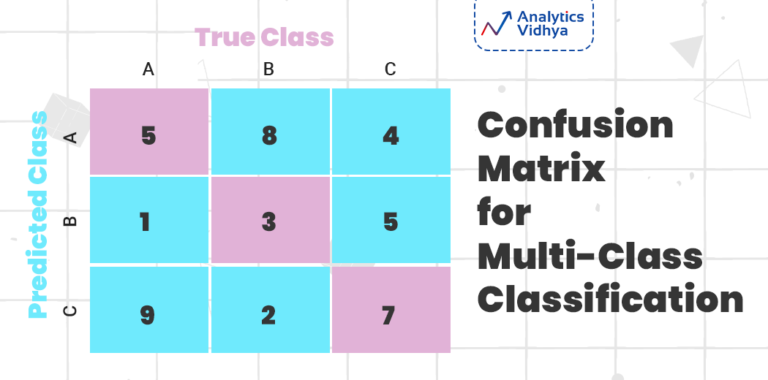
Here‘s an example of plotting a confusion matrix of a classification model using Seaborn‘s heatmap:
from sklearn.metrics import confusion_matrix
mat = confusion_matrix(y_true, y_pred)
sns.heatmap(mat, square=True, annot=True, cbar=False, cmap=‘Blues‘)
Source: Shaked Zychlinski, "The Ultimate Guide to Confusion Matrix" (Towards Data Science)
The confusion matrix shows the counts of true positives, true negatives, false positives, and false negatives. Plotting it as a heatmap with annotations makes it easy to quickly see the performance of the classifier.
Another important plot for evaluating binary classifiers is the ROC curve, which shows the tradeoff between true positive rate and false positive rate at different classification thresholds:
from sklearn.metrics import roc_curve
fpr, tpr, thresholds = roc_curve(y_true, y_scores)
sns.lineplot(x=fpr, y=tpr)
An ideal classifier would have a true positive rate of 1 and false positive rate of 0, corresponding to the upper left corner of the plot. The diagonal line represents the expected performance of a random classifier.
Visualizing model performance is key for debugging, model selection, and communicating results to stakeholders. Seaborn provides a concise API for creating model evaluation plots that are easy interpret.
Styling and Customization
While Seaborn‘s default plot styles are already quite attractive, it provides a number of options for customizing the look of your plots to fit your needs. The set_theme function lets you globally set the plot style:
sns.set_theme(style=‘darkgrid‘, palette=‘deep‘, font=‘sans-serif‘, font_scale=1.2)
This sets plot backgrounds to a dark grid, uses a colorful palette, and increases the font size globally. You can see a full list of style options in the Seaborn documentation.
For more granular control over plot elements, you can use matplotlib‘s rcParams dictionary:
import matplotlib as mpl
mpl.rcParams[‘figure.figsize‘] = (8, 6)
mpl.rcParams[‘xtick.labelsize‘] = 14
mpl.rcParams[‘ytick.labelsize‘] = 14
This sets the default figure size and increases the font size of the x and y tick labels. Nearly every plot element from line widths to label text can be customized through rcParams.
Beyond the plot style, a very powerful feature of Seaborn is its ability to compose multiple plots on the same figure using the FacetGrid class. This allows you to create complex, multi-plot figures that show relationships across multiple variables.
For example, here‘s how you can create a grid of scatter plots showing the pairwise relationships between features for each class in the Iris dataset:
g = sns.FacetGrid(iris_data, col=‘species‘, hue=‘species‘, col_wrap=3)
g.map(sns.scatterplot, ‘sepal_length‘, ‘sepal_width‘)
g.add_legend()
The col parameter splits the data by species into separate columns, while hue color-codes the points by species. The col_wrap parameter sets the number of columns in the grid. Finally, we map the scatterplot function to each subplot and add a legend.
Facet grids are an extremely useful tool for exploring high-dimensional data and visualizing complex relationships. Customizing the plot styles within the grid allows you to create publication-quality figures that effectively communicate insights.
Real-World Use Cases
To motivate the use of Seaborn in real AI/ML workflows, let‘s look at a few examples of its use in research and industry.
In the paper "Cardiologist-level arrhythmia detection with convolutional neural networks", researchers at Stanford used Seaborn to visualize the performance of deep learning models for detecting heart arrhythmias in electrocardiogram data:

Source: Pranav Rajpurkar et al., "Cardiologist-level arrhythmia detection with convolutional neural networks", PMLR 2017
The confusion matrix heatmap and precision-recall curve created with Seaborn allow the researchers to concisely summarize the model‘s performance across different classes of heartbeat irregularities.
At Uber, data scientists used Seaborn to analyze and visualize data from their ride-sharing platform. In the blog post "Examining the Efficiency of the Global Taxi System", they used Seaborn to create plots showing patterns in ride duration and speed across cities:

Source: Ji Shen, "Examining the Efficiency of the Global Taxi System" (Uber Engineering Blog)
The kernel density plot shows the distribution of ride durations, while the violin plot compares the distribution of average speeds across different cities. These visualizations help uncover insights about global transit efficiency.
Finally, Seaborn is frequently used in Kaggle competitions to explore datasets and visualize results. For example, in the "Titanic: Machine Learning from Disaster" competition, many of the top entries used Seaborn to understand the structure of the passenger data and communicate insights. Here‘s an example kernel using Seaborn‘s plotting functions:

Source: Dataquest, "Exploring Survival on the Titanic" (Kaggle Notebook)
The barplot shows the average survival rate for passengers based on their sex and passenger class, revealing that women and higher-class passengers were more likely to survive. Visualizations like these help inform feature engineering and modeling choices.
From academic research to industry applications to data science competitions, Seaborn is a valuable tool for AI/ML practitioners looking to explore and communicate insights in their data.
Conclusion
In this guide, we‘ve seen how Seaborn is a powerful ally for AI and machine learning visualization. Its main strengths are:
- Attractive statistical plots that are quick and easy to create
- Support for visualizing high-dimensional datasets
- Statistical functions for understanding distributions and relationships
- Plots for evaluating machine learning models
- Highly customizable plot styles for tailoring visualizations
We‘ve also seen real-world examples of Seaborn being used for AI/ML research and applications in areas like healthcare, ride-sharing, and Kaggle competitions.
While we‘ve covered a lot of ground, this only scratches the surface of what‘s possible with Seaborn. I encourage you to explore the Seaborn documentation and gallery to see the full range of capabilities and example use cases.
Data visualization is both a science and an art, and Seaborn makes it accessible for both experts and beginners alike. By leveraging this powerful library, you‘ll gain insights faster and communicate results more effectively. Now go out there and make some beautiful, impactful visualizations!