
The Top Audio Editors of 2026: Find the Right Software for Any Project

As an audio editing software specialist, I‘ve witnessed firsthand the rapid evolution of these tools over the past decade. While audio editors used to provide only basic waveform editing, many now leverage advanced AI to offer powerful capabilities like noise reduction, audio restoration, and even transcription-based editing.
In this comprehensive guide, I‘ll cover everything you need to know to find the right audio editing software for music production, podcasting, video soundtracks, or any other application.
The Changing Landscape of Audio Editors
Audio editing software has come a long way from the early days of manually cutting and splicing tape. The digitization of audio opened the doors to non-linear, non-destructive editing in software like Audacity—where you could edit waveforms without permanently altering the source file.
Things escalated quickly in the 2010s, however. Rapid advancements in artificial intelligence and machine learning made new features like automatic noise reduction and audio restoration possible by analyzing recordings and filtering out unwanted sounds. And transcription-based editing tools now allow manipulating recordings through automatically generated text transcripts.
I predict machine learning will enable even more advancements in coming years. Software may one day edit recordings with little-to-no human guidance to improve quality, remove ums and ahs, tighten pacing, and more. For now, AI capabilities remain largely supplemental to manual editing in most products, but they undeniably expand what‘s creatively possible.
Waveform Editors vs. Full-Featured DAWs
When evaluating audio editing options, it helps to understand the difference between basic waveform editors and more robust digital audio workstations (DAWs):
Waveform editors provide tools for trimming, splitting, merging and applying effects to existing audio files through a visual interface. They excel at faster edits.
DAWs enable recording, arranging multi-track compositions, hosting virtual instruments/synthesizers and advanced mixing capabilities akin to a full recording studio. They support more complex projects.
There‘s overlap in capabilities, but think of waveform editors as chisels and DAWs as Swiss army knives. Specialized tools also exist explicitly for podcast production, radio editing, transcription and other niche tasks. I‘ll recommend the best of each type.
6 Key Evaluation Criteria for Audio Editors
When researching the top audio editing solutions on the market, I assessed each based on the following core criteria:
- Interface and workflow: Is the interface clean, intuitive and conducive to fast editing? Or overly technical? Can you customize it?
- Effects and plugins: Does the software offer a solid library of built-in effects and plugins for processing recordings? Can you expand with third-party VST/AU plugins?
- Ease of use: How difficult is the learning curve? Does the software provide sufficient tutorials, help documentation and an active user community?
- Value: Does the feature set justify the pricing model? Or do more affordable options offer stronger value?
- AI capabilities: To what extent does the software leverage artificial intelligence/machine learning for workflow enhancements? How well do these features perform?
- Special capabilities: Does the software excel in any specific use case like podcast production or video soundtrack editing?
Keeping these criteria in mind, these are the top audio editors I recommend in 2023:
The 8 Best Audio Editors of 2023
1. Adobe Audition – Best Overall Audio Editor
When it comes to balancing professional-grade tools with cutting-edge AI capabilities, Adobe Audition still reigns supreme. It builds on over 20 years of development to push the limits of destructive and non-destructive audio editing.
I regularly rely on Audition myself for challenging sound design tasks, including editing long-form podcasts and mixing video game soundtracks. The sheer horsepower and refinement under the hood leaves little to be desired.
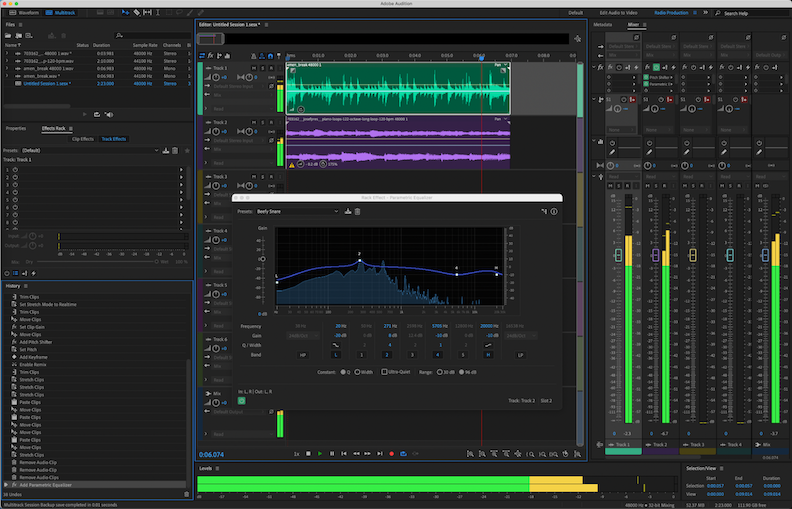
Key features:
- Intuitive multi-track mixing and waveform editing
- Best-in-class audio restoration powered by AI
- Tight integration with other Adobe Creative Cloud apps
- Fully-customizable interface with macros for accelerating repetitive tasks
Between its professional toolset and still-competitive pricing among high-end DAWs, Adobe Audition retains its place as my foremost recommendation for audio post-production and mixing.
Price: $20.99/month subscription (includes free trial)
2. Avid Pro Tools | First – Top Pick for Music Production
For bands, solo artists, composers and music producers who need to record original songs and instrumentals, Avid Pro Tools | First fills an ideal middle-ground.
As a free version of the industry-standard Pro Tools DAW, First still provides a capable foundation for basic multi-track recording and mixing without the high cost barrier or complexity.
If your music projects call for working with virtual instruments, recording live inputs or editing MIDI compositions, I suggest giving Pro Tools | First a try before considering the pricier paid tiers.

Key features:
- 16 audio and 8 MIDI tracks per project
- Quality collection of virtual instruments and effects
- Direct compatibility with all Pro Tools add-ons
- Free mobile app for remote mixing
Avid wisely chose not to limit core functionality that matters most for serious hobbyists in First. As your needs grow, you can pay to upgrade.
Price: Free version of Pro Tools
3. Hindenburg Journalist PRO 2 – Top Pick for Podcast Editing
While Hindenburg Journalist caters specifically to radio news workflows, Hindenburg Journalist PRO 2 adapts the same user-friendly concept for podcast production.
Rather than confront users with traditional waveforms and tracks, Hindenburg structures audio as easy-to-rearrange "blocks" on a timeline. Just drag and drop any recorded or imported clips into place, then export.
But the PRO 2 edition most notably enables editing those audio blocks after the fact. You can remove unwanted segments, attach effects and balance levels with targeted AI processing.

Key features:
- Optimized interface for podcast editing
- Automated or customizable audio effects
- Built-in recorder, asset library and transcription
- Collaborative workflows
If you want software tailored specifically to improving podcast post-production efficiency, Hindenburg PRO 2 more than deserves your consideration.
Price: $95 one-time purchase
4. Audacity – Best Free Audio Editor
Despite its unassuming appearance, the free, open-source Audacity waveform editor holds its own against paid counterparts in core functionality.
For basic cutting, splitting, merging and format conversions, Audacity performs just as well as options costing $50-60. The effects library also impresses with quality built-in reverb, echo, equalization, noise reduction and amplification effects.

If I simply needed to do basic clean-up edits and mixes for a video or podcast, Audacity would likely be my tool of choice over spending for incremental upgrades. Don‘t let the lack of polish fool you.
Key features:
- Cross-platform support for macOS, Windows and Linux
- Active open-source community maintaining development
- Extensive file format compatibility
- VST plugin support
For the non-professional audio editor on a tight budget, Audacity remains a capable production suite.
Price: 100% Free
5. TwistedWave Online – Top Browser-Based Choice
With TwistedWave Online, you can edit audio waveforms directly within your web browser without installing any software locally.
The interface mirrors desktop waveform editors in applying cuts, trims and effects to recordings. An integrated recorder even lets you capture audio straight into your browser session when needed.

The ability to access these tools through any modern web browser makes TwistedWave Online ideal for quick edits while away from your normal production machine.
Key features:
- Waveform editing, recording and basic mastering tools
- 5 GB free cloud storage for saving sessions
- Collaborative editing in real-time like Google Docs
- Support for backing up data locally
If the idea of browser-based audio editing appeals to you, don‘t hesitate to give TwistedWave Online a spin.
Price: Free or $9/month subscription
6. Sound Forge Audio Studio 2023 – Top Budget Windows Choice
Sound Forge Audio Studio 2023 packs an impressive amount of editing horsepower into a sub-$100 package. The streamlined toolset marks an ideal starting point for amateurs on Windows seeking to move beyond entry-level apps.
You get a customizable interface, waveform editing, spectral analysis, rich metadata support and quality mastering effects powered by Blue Cat Audio—all for under 4x the cost of a Starbucks latte per month over 12 months!

Key features:
- Single-track audio editing and mastering
- Video soundtrack editing capabilities
- Blue Cat mastering and restoration plugins
- Support for third-party VST3/VST2 effects
If you‘re searching for an affordable step up from Audacity on Windows, put Sound Forge Audio Studio 2023 on your radar.
Price: $99 or $3.99/month subscription
7. Logic Pro – Most Affordable Apple DAW
Among macOS-exclusive DAWs, Logic Pro provides the most complete production package for the money. The software continues to add new features while keeping the same reasonable $200 asking price.
Logic supports recording both audio and virtual instrument tracks, intuitive mixing, a massive built-in sample library and advanced composition tools powered by AI. Throw in seamless integration with macOS and iOS devices, and Logic Pro feels like a steal.

Key Features:
- Powerful digital audio workstation for macOS
- 5000+ software instrument sounds included
- Advanced AI-based composition tools
- Full compatibility with all macOS and iOS devices
If you prefer working on Apple devices for music production, I highly recommend giving Logic Pro a close look before any competitor.
Price: One-time $200 payment
8. Descript Podcast Studio – Top AI-Assisted Podcast Editor
While AI currently plays a supplemental role in most audio software, Descript Podcast Studio places it front and center. The web-based editor leverages machine learning to generate an editable text transcript of your podcast recordings automatically.
Simply edit the transcript like a document to insert, reorder or remove speech. Descript handles applying those changes at a granular audio level for you upon export.

Key features:
- AI-powered transcription and editing
- Collaborative workflows
- Overlap removal and editing assistance
- Customizable publishing
If you want to build podcasts through easy text editing rather than waveforms, Descript Podcast Studio offers a uniquely streamlined approach.
Price: $12/month subscription
Which Editor Suits Your Needs?
The best audio editing software ultimately depends on your use case. Here are my top picks tailored to common production scenarios:
- Music production: Avid Pro Tools | First or Logic Pro
- Podcast editing: Hindenburg Journalist PRO 2 or Descript Podcast Studio
- Video post-production: Adobe Audition or TwistedWave Online
- Journalism workflows: Hindenburg Journalist
- Audiobook mastering: SOUND FORGE Audio Studio
- AI-assisted editing: Descript Podcast Studio
- Multiplatform support: Audacity or TwistedWave Online
I hope mapping out the landscape of feature sets and ideal use cases helps you zero in on the right audio editor for your next big project!
The Future of Audio Editors
Exciting times lie ahead in the world of audio editing software. While AI assistance already enables new editing methods today in apps like Descript, I expect machine learning practitioners will continue pushing boundaries of what‘s possible.
Within 5 years, I predict:
- Seamless audio quality enhancement: Software will clean up unwanted background noise, clipping, pops, inconsistent volume and more with a single click.
- Intelligent editing suggestions: Algorithms will start advising on improvements like shortening pauses, removing filler words, changing pacing and ordering segments for greater impact like a producer over your shoulder.
- Lifelike voice manipulation: We‘ll sound like an entirely different person or simulate a crowd with ease through AI modification rather than manual pitching/effects.
- Built-in accountability: To combat misuse of powerful voice/speech editing tricks, tools may watermark exports or embed audit trails documenting modifications.
Audio editing undoubtedly still requires a human touch… for now. But software continues progressing toward minimizing rote tasks while expanding creative possibilities.
I can‘t wait to see what innovators like Descript, Adobe and newcomers to the space develop next!
Key Takeaways
Here are my core recommendations if you‘re seeking a new audio editing solution today:
- Consider your use case: Podcasting, music, video post work? Different software suits different goals.
- Weigh free vs. paid: Feature-rich free editors exist (e.g. Audacity), but often lack polish and capabilities of paid tools.
- Look for AI features: Noise reduction, audio restoration and assisted editing via AI offer big workflow boosts.
- Adobe Audition still reigns supreme: If budget allows, Audition provides the most robust overall feature set.
- Try before you buy: Nearly all paid software offers free trials so you can test drive editors.
Hopefully this overview dispels any confusion over modern audio editing software. Let me know if you have any other questions! I‘m always happy to chat more in depth.


