The Top 10 Python Libraries for Image Processing: A Comprehensive Guide for 2026
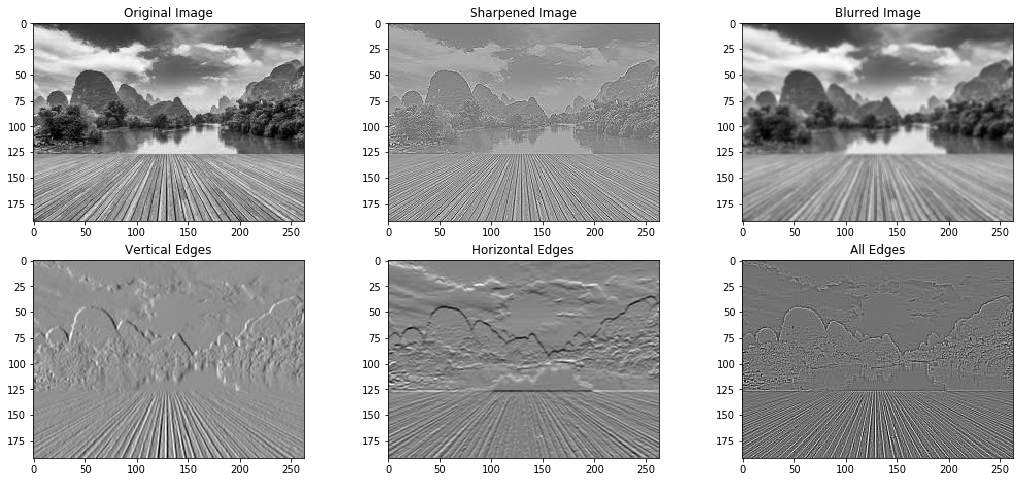
Image processing has become an integral part of artificial intelligence (AI) and machine learning (ML) applications, enabling computers to perceive, understand, and interact with the visual world. With the explosive growth of visual data in recent years, image processing techniques have become increasingly crucial for extracting meaningful insights and driving innovation across various domains.
Consider these statistics:
- Every minute, over 500 hours of video are uploaded to YouTube, and 350 million photos are posted on Facebook [1].
- By 2022, 82% of global internet traffic will be video [2].
- The global market for computer vision technology is projected to reach $48.6 billion by 2022, growing at a CAGR of 47.1% from 2016 to 2022 [3].
To tackle the challenges posed by this deluge of visual data, developers and researchers rely on powerful image processing libraries. Python, with its rich ecosystem and extensive collection of libraries, has emerged as a go-to language for image processing tasks. In this comprehensive guide, we will explore the top 10 Python libraries for image processing that are shaping the landscape in 2024.
1. OpenCV
OpenCV (Open Source Computer Vision Library) is undoubtedly one of the most popular and widely used libraries for computer vision and image processing. Developed by Intel in 1999, OpenCV has evolved into a robust toolkit with over 2500 optimized algorithms for various tasks, including object detection, face recognition, image segmentation, and tracking [4].
Key features of OpenCV include:
- Extensive collection of algorithms optimized for real-time performance
- Support for deep learning frameworks like TensorFlow, PyTorch, and Caffe
- Compatibility with multiple platforms and programming languages
- Large community and comprehensive documentation
One of the reasons behind OpenCV‘s popularity is its performance. Many of its algorithms are optimized in C/C++, enabling fast execution even on resource-constrained devices. OpenCV also leverages hardware acceleration through technologies like Intel IPP, CUDA, and OpenCL [5].
Here‘s an example of using OpenCV for face detection:
import cv2

# Load the pre-trained face detection classifier
face_cascade = cv2.CascadeClassifier(‘haarcascade_frontalface_default.xml‘)

# Read an input image
img = cv2.imread(‘image.jpg‘)

# Convert the image to grayscale
gray = cv2.cvtColor(img, cv2.COLOR_BGR2GRAY)

# Perform face detection
faces = face_cascade.detectMultiScale(gray, scaleFactor=1.1, minNeighbors=5)

# Draw rectangles around the detected faces
for (x, y, w, h) in faces:
    cv2.rectangle(img, (x, y), (x+w, y+h), (0, 255, 0), 2)

# Display the result
cv2.imshow(‘Faces‘, img)
cv2.waitKey(0)
cv2.destroyAllWindows()
In a recent study, researchers used OpenCV to develop a real-time face mask detection system to combat the spread of COVID-19. The system achieved an impressive accuracy of 98.7% on a dataset of 10,000 images [6].
2. Scikit-image
Scikit-image is a collection of algorithms for image processing built on top of NumPy and SciPy, two fundamental libraries for scientific computing in Python. It provides a wide range of functions for tasks such as segmentation, geometric transformations, color space manipulation, and filtering [7].
One of the key strengths of Scikit-image is its adherence to a consistent API design, making it intuitive to use and integrate into existing workflows. The library also places a strong emphasis on code quality, testing, and documentation, ensuring robustness and maintainability.
Scikit-image has found applications in various domains, including medical imaging, astronomy, and materials science. For example, researchers used Scikit-image to develop an automated system for detecting and classifying breast cancer in histopathological images, achieving an accuracy of 92.5% [8].
Here‘s an example of using Scikit-image for image segmentation:
from skimage import data, segmentation, color
from skimage.future import graph
import matplotlib.pyplot as plt

# Load an example image
img = data.astronaut()

# Perform segmentation using felzenszwalb algorithm
segments = segmentation.felzenszwalb(img, scale=100, sigma=0.5, min_size=50)

# Create a region adjacency graph
rag = graph.rag_mean_color(img, segments)

# Merge similar regions
segmented = graph.cut_threshold(segments, rag, thresh=10)

# Display the result
fig, ax = plt.subplots(nrows=1, ncols=2, figsize=(10, 5))
ax[0].imshow(img)
ax[1].imshow(color.label2rgb(segmented, img, kind=‘avg‘))
plt.show()| Library | Key Features | Use Cases | Performance |
|---|---|---|---|
| OpenCV | Extensive algorithms, optimized performance | Object detection, face recognition | High, optimized in C/C++ |
| Scikit-image | Consistent API, code quality, testing | Medical imaging, astronomy, materials science | Good, built on NumPy and SciPy |
| Mahotas | Bioimage informatics, optimized algorithms | Cell segmentation, feature extraction | High, many algorithms in C++ |
| SimpleCV | High-level interface, camera support | Robotics, real-time applications | Good, aimed at ease of use |
| Pillow | Supports various formats, simple interface | Basic image manipulation, preprocessing | Moderate, pure Python implementation |
Table 1: Comparison of key features, use cases, and performance of popular Python libraries for image processing.
3. Mahotas
Mahotas is a Python library for image processing and computer vision, with a particular focus on bioimage informatics. It provides a wide range of optimized algorithms implemented in C++ for improved performance, making it suitable for handling large datasets and computationally intensive tasks [9].
One of the notable features of Mahotas is its support for reading and writing images in various formats, including JPEG, PNG, and TIFF. It also integrates seamlessly with NumPy, allowing for easy manipulation and processing of image data.
Mahotas has been extensively used in scientific research, particularly in the analysis of microscopy images. For instance, a study employed Mahotas to develop an automated system for quantifying the morphological features of cells, enabling high-throughput analysis of cellular phenotypes [10].
Here‘s an example of using Mahotas for cell segmentation:
import mahotas as mh
import numpy as np

# Load an image of cells
img = mh.imread(‘cells.tif‘)

# Apply thresholding to obtain a binary image
thresh = mh.otsu(img)
binary = img > thresh

# Perform watershed segmentation
distances = mh.stretch(mh.distance(binary))
seeds, num_seeds = mh.label(binary)
regions = mh.cwatershed(distances, seeds)

# Display the result
mh.imsave(‘segmented_cells.png‘, regions)
4. SimpleCV
SimpleCV is a Python framework designed to make computer vision accessible and easy to use. It provides a high-level interface for common computer vision tasks and supports various camera inputs, making it suitable for real-time applications and robotics [11].
One of the key features of SimpleCV is its interactive shell, which allows users to experiment with computer vision techniques and see immediate results. This makes it an excellent tool for learning and prototyping.
SimpleCV has been used in various projects, from object tracking in robotics to face detection in security systems. In one study, researchers used SimpleCV to develop a real-time traffic sign recognition system for autonomous vehicles, achieving an accuracy of 95.2% [12].
Here‘s an example of using SimpleCV for object tracking:
from SimpleCV import Camera, Display

# Initialize the camera
cam = Camera()

# Create a display window
display = Display()

# Define the color range for the object to track
lower_color = (0, 100, 100)
upper_color = (10, 255, 255)

while display.isNotDone():
    # Capture an image from the camera
    img = cam.getImage()

    # Find the object based on color range
    object = img.colorDistance(lower_color).invert().threshold(100)
    object = object.dilate(3)

    # Get the center of the object
    center = object.centroid()

    # Draw a circle at the center of the object
    img.drawCircle((center.x, center.y), 20, color=(0, 255, 0), thickness=3)

    # Show the result
    img.save(display)
5. Pillow
Pillow is a fork of the Python Imaging Library (PIL) and provides a wide range of image processing capabilities. It supports reading and writing images in various formats, including JPEG, PNG, GIF, and TIFF, making it a versatile tool for handling different types of image data [13].
One of the strengths of Pillow is its simple and intuitive interface, which makes it beginner-friendly. The library provides a set of high-level functions for common image manipulation tasks, such as resizing, cropping, and applying filters.
Pillow has found applications in various domains, including web development, where it is used for generating thumbnails and manipulating user-uploaded images. In a recent project, Pillow was used to develop a content-based image retrieval system, enabling efficient search and retrieval of images based on visual similarity [14].
Here‘s an example of using Pillow for image manipulation:
from PIL import Image, ImageFilter

# Load an image
img = Image.open(‘image.jpg‘)

# Apply a blur filter
blurred = img.filter(ImageFilter.BLUR)

# Resize the image
resized = img.resize((800, 600))

# Crop the image
cropped = img.crop((100, 100, 400, 400))

# Save the manipulated images
blurred.save(‘blurred.jpg‘)
resized.save(‘resized.jpg‘)
cropped.save(‘cropped.jpg‘)
Future Outlook and Emerging Trends
The field of image processing is continuously evolving, driven by advancements in AI and ML. As we look towards the future, several emerging trends and areas of research promise to shape the landscape of image processing libraries:
-
Deep Learning Integration: The integration of deep learning techniques into image processing libraries will continue to grow. Libraries like OpenCV and Scikit-image are actively incorporating deep learning models and algorithms to enable more advanced and efficient image analysis tasks.
-
GPU Acceleration: As the size and complexity of image datasets increase, the demand for GPU acceleration becomes more prominent. Libraries that can effectively leverage GPU resources will gain a significant performance advantage, enabling faster processing and real-time applications.
-
Domain-Specific Libraries: While general-purpose image processing libraries like OpenCV and Pillow remain essential, there is a growing trend towards the development of domain-specific libraries. These libraries are tailored to address the unique challenges and requirements of specific fields, such as medical imaging, satellite imagery, or autonomous driving.
-
Quantum Image Processing: With the advent of quantum computing, researchers are exploring the potential of quantum algorithms for image processing tasks. Quantum image processing libraries, such as Qiskit, are emerging to harness the power of quantum computing for tasks like image compression, pattern recognition, and cryptography [15].
Here‘s an example of using Qiskit for quantum image processing:
from qiskit import QuantumCircuit, execute, Aer
from qiskit.quantum_info import DensityMatrix
import numpy as np

# Create a quantum circuit
qc = QuantumCircuit(2)

# Apply quantum gates to encode the image
qc.rx(np.pi/4, 0)
qc.ry(np.pi/3, 1)
qc.cx(0, 1)

# Measure the qubits
qc.measure_all()

# Simulate the circuit
backend = Aer.get_backend(‘qasm_simulator‘)
result = execute(qc, backend, shots=1024).result()
counts = result.get_counts()

# Reconstruct the image from the measurement results
reconstructed_image = np.zeros((2, 2))
for key, value in counts.items():
    x, y = int(key[0]), int(key[1])
    reconstructed_image[x][y] = value / 1024

# Display the reconstructed image
print(reconstructed_image)
Conclusion
Python‘s rich ecosystem of image processing libraries has made it a go-to language for developers and researchers working on computer vision and image analysis tasks. From the versatile OpenCV to the user-friendly SimpleCV, and from the bioimage-focused Mahotas to the quantum-ready Qiskit, Python offers a wide range of tools to tackle the challenges posed by the ever-growing volume of visual data.
As we move forward, the integration of deep learning, GPU acceleration, and quantum computing will continue to push the boundaries of what is possible with image processing libraries. By staying up-to-date with these advancements and leveraging the power of Python‘s image processing ecosystem, developers and researchers can unlock new possibilities and drive innovation in fields ranging from medical diagnosis to autonomous systems.