Deploying PySpark Machine Learning Models on Google Cloud with Streamlit
Machine learning (ML) is transforming industries and becoming an indispensable tool for data-driven organizations. As datasets grow larger and models become more complex, traditional single-node tools like scikit-learn can fall short. That‘s where distributed ML frameworks like Apache Spark‘s MLlib library shine. PySpark MLlib provides a powerful, scalable platform for training ML models on massive datasets.
However, building models is only part of the story. To derive business value, ML models need to be deployed to production and made accessible to end-users. In this post, we‘ll walk through the process of developing PySpark ML models and deploying them as interactive web applications on Google Cloud Platform (GCP) using Streamlit. By the end, you‘ll have a detailed playbook for productionizing ML at scale.
Why PySpark MLlib?
PySpark MLlib is the Python API for Spark‘s distributed machine learning library. It provides high-quality algorithms for classification, regression, clustering, collaborative filtering, and more. Some key advantages of PySpark MLlib include:
-
Scalability: MLlib can crunch through terabytes of data thanks to Spark‘s distributed computing capabilities. It‘s battle-tested in production at massive companies like Netflix, Uber, and Alibaba.
-
Performance: Spark‘s in-memory caching and efficient query execution speeds up ML workflows. Models can be trained on huge datasets in a fraction of the time compared to single-node solutions.
-
Extensive algorithms and tools: MLlib covers most common ML use cases out-of-the-box. It also integrates with other powerful libraries like XGBoost, TensorFlow, and PyTorch.
-
Easy deployment: PySpark pipelines make it simple to serialize trained models and deploy them for batch or online inference in a variety of serving environments.
Building PySpark ML Models
While the specific steps vary depending on the use case, a typical PySpark ML workflow involves:
- Loading and exploring data, e.g. from CSV, JSON, Parquet or Spark SQL tables
- Preprocessing and feature engineering, e.g. handling missing values, encoding categorical variables, scaling, normalization, etc. PySpark Pipelines are very handy for chaining transformations.
- Splitting data into train, validation and test sets
- Spot-checking multiple algorithms (e.g. logistic regression, decision trees, random forests, gradient-boosted trees, etc.)
- Hyperparameter tuning and model selection using cross-validation
- Evaluating winning model on hold-out test set
- Saving model for production deployment
Here is sample code illustrating parts of this workflow:
# Load data
data = spark.read.format("csv").load("s3://bucket/data.csv", header=True, inferSchema=True)

# Encode categorical features
indexer = StringIndexer(inputCols=["category"], outputCols=["category_index"])
encoder = OneHotEncoder(inputCols=["category_index"], outputCols=["category_encoded"])

# Scale numeric features
scaler = RobustScaler(inputCol="num_feature", outputCol="scaled_feature")

# Assemble feature vector
vectorizer = VectorAssembler(inputCols=["scaled_feature", "category_encoded"], outputCol="features")

# Define model
rf = RandomForestRegressor(featuresCol="features", labelCol="price_label")

# Hyperparameter tuning
paramGrid = ParamGridBuilder() \
  .addGrid(rf.numTrees, [10, 50, 100]) \
  .addGrid(rf.maxDepth, [5, 10]) \
  .build()

cv = CrossValidator(estimator=rf, estimatorParamMaps=paramGrid, evaluator=RegressionEvaluator(), numFolds=3)

# Train model with best hyperparameters
cvModel = cv.fit(train_data)
bestModel = cvModel.bestModel

# Evaluate on test data
predictions = model.transform(test_data)
rmse = RegressionEvaluator(labelCol="price", predictionCol="prediction", metricName="rmse").evaluate(predictions)
r2 = RegressionEvaluator(labelCol="price", predictionCol="prediction", metricName="r2").evaluate(predictions)

# Save model
bestModel.write().overwrite().save("s3://bucket/model")
The full code is available on GitHub. In this example, we load Airbnb rental data, preprocess features, train and tune a Random Forest model to predict rental prices, evaluate on a test set, and finally save the model. We leverage PySpark Pipelines to streamline the feature engineering and model training process.
Designing a Streamlit Web App
To make the price prediction model accessible to end-users, we‘ll create an interactive web app using Streamlit. Streamlit is an open-source Python library that enables developers to quickly build data apps and ML demos.
Our Streamlit app will allow users to input rental property characteristics (e.g. location, number of bedrooms, amenities, etc.) and get a price prediction from the trained PySpark model. Here are the key components:
- Load saved PySpark model
- Define input widgets for property features
- Define Streamlit cache for model predictions (to avoid reloading model on each interaction)
- Make price prediction on user input
- Display predicted price and evaluation metrics
- Visualize feature importances
Here is a simplified version of the Streamlit app:
import streamlit as st
from pyspark.sql import SparkSession
from pyspark.ml.regression import RandomForestRegressionModel

# Load model
spark = SparkSession.builder.appName("RentalPricePrediction").getOrCreate()
model = RandomForestRegressionModel.load("s3://bucket/model")

# Define input widgets
location = st.selectbox("Location", ["Manhattan", "Brooklyn", "Queens", "Staten Island", "Bronx"])
bedrooms = st.number_input("Bedrooms", min_value=0, max_value=10, value=1)
amenities = st.multiselect("Amenities", ["WiFi", "Kitchen", "TV", "Washer", "Dryer", "Gym"])

# Preprocess input
input_data = spark.createDataFrame(
  [(location, bedrooms, amenities)],
  ["location", "bedrooms", "amenities"])

@st.cache
def make_prediction(data):
  prediction = model.transform(data).select("prediction").collect()[0][0]
  return prediction

# Make prediction on input data
if st.button("Predict Price"):
  price = make_prediction(input_data)
  st.success(f"The predicted rental price is ${price:.2f}")
  st.bar_chart(model.featureImportances)
This loads the trained model, defines input widgets using Streamlit‘s built-in components, preprocesses the input data into a Spark DataFrame, makes a prediction using the model, and finally displays the result along with feature importances. The @st.cache decorator is used to memoize the make_prediction function, so the model isn‘t reloaded each time the user interacts with the app.
Deploying on Google Cloud Platform
To deploy our Streamlit app, we‘ll utilize Google Compute Engine which allows us to provision Virtual Machines (VMs) and access them over the internet. Here are the high-level steps:
- Create a new GCP project and enable billing
- Launch a new VM instance with sufficient memory/CPU for your model (e.g. n1-standard-4)
- Allow HTTP/HTTPS traffic to the VM
- SSH into the VM
- Install Java, PySpark, Streamlit and other dependencies
- Copy model files and Streamlit app code to VM
- Run Streamlit app on port 8501
- Access Streamlit app on external IP of VM
First, create a new project on GCP and note down the project ID. Then navigate to Compute Engine and click "Create Instance". Choose an instance type with at least 15GB memory and 4 vCPUs. Select "Allow HTTP traffic" and "Allow HTTPS traffic" under Firewall. Optionally, you can also add a startup script to automatically install dependencies when the VM boots up.
Once the VM is created, click the "SSH" button to open a terminal window. Run the following commands to install Java 8, PySpark 3.2, Streamlit and other libraries:
# Install Java 8
sudo apt-get update
sudo apt-get install openjdk-8-jdk

# Install Python 3 and pip
sudo apt-get install python3 python3-pip

# Install PySpark
pip3 install pyspark==3.2.0

# Install Streamlit and other dependencies
pip3 install streamlit matplotlib plotly

# Verify installations
java -version
pyspark --version
streamlit --version
Next, copy over the trained model files, Streamlit app code, and any other required files to the VM. You can either use the Cloud Storage SDK or SCP to transfer files. For example:
# Copy model and code from Cloud Storage
gsutil cp gs://my-bucket/model.tar .
gsutil cp gs://my-bucket/streamlit_app.py .

# Untar model files
tar -xvf model.tar
Finally, run the Streamlit app:
streamlit run app.py --server.port 8501This will start the Streamlit server on port 8501. To access the app from a browser, open a new tab and navigate to http://EXTERNAL-IP:8501, replacing EXTERNAL-IP with the external IP address of your VM. You should see the rental price prediction app!
Best Practices and Next Steps
While we covered the core steps to deploying a PySpark ML model with Streamlit and GCP, there are several additional considerations for operationalizing ML in production:
-
Model monitoring: Implement checks for data drift, model staleness, and prediction quality. Tools like GCP AI Platform enable logging and monitoring of ML pipelines.
-
Deployment automation: Codify model deployment steps into repeatable workflows using infrastructure-as-code tools like Cloud Build and Terraform. This allows easy updates and rollbacks.
-
Scaling: Use GCP Autoscaler to automatically add/remove VM instances based on traffic. For extremely high-volume use cases, consider deploying on GCP AI Platform or GCP Dataproc.
-
Security: Manage access control by assigning appropriate IAM roles. Use Cloud Identity-Aware Proxy to add user login and authorization to Streamlit. Protect sensitive data with encryption and VPC networks.
-
CI/CD: Integrate model deployment into software development lifecycle using CI/CD pipelines. This allows automated testing and deployment of model updates.
-
A/B testing: Utilize traffic splitting to test new model versions on a subset of users. GCP can route specified percentages of prediction traffic to different model versions.
-
Monitoring: Use GCP‘s operations suite including Cloud Logging and Cloud Monitoring to monitor apps for latency, errors, and resource utilization. Set up alerts on key thresholds.
-
Cost optimization: Utilize committed use discounts and VM instance sizing to reduce infrastructure costs. Move infrequently accessed data to lower-cost storage.
Beyond GCP, there are several alternative deployment options each with their pros and cons. GCP App Engine is a fully managed platform that simplifies deployment but has limitations for GPU-dependent models. AWS SageMaker and Azure ML are comparable managed ML platforms. Open-source tools like Seldon and KFServing can be used to deploy models on Kubernetes clusters. The choice depends on factors like current tech stack, cost, team skills, and model requirements.
In the future, we can expect even tighter integration between cloud providers and popular ML frameworks. Advances in ML compilers and model serving platforms will further simplify and speed up deployments. Techniques like federated learning and confidential computing will enhance privacy and security. Tools for drift detection, fairness auditing, and model explanations will enable more responsible AI.
Conclusion
Bringing ML models to life is a critical yet challenging endeavor for organizations. PySpark MLlib provides a scalable framework for training models on massive datasets. With Streamlit‘s user-friendly interface and GCP‘s reliable infrastructure, data scientists can deploy interactive ML apps in a matter of hours.
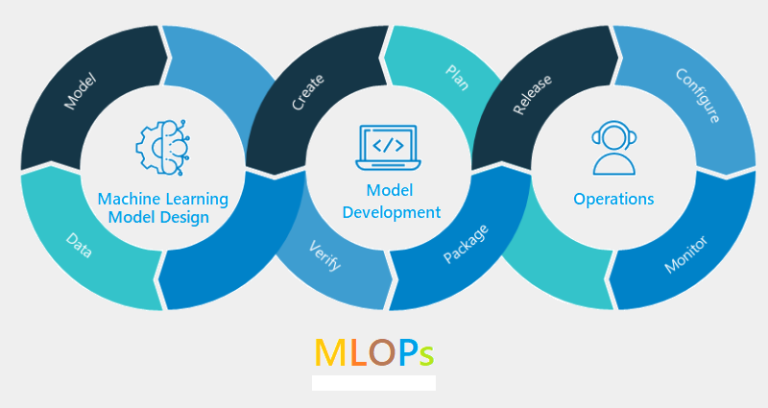
The steps we outlined form a general framework for productionizing PySpark ML models:
- Build models using PySpark MLlib
- Create Streamlit app to surface model predictions
- Deploy app on GCP VM and configure access
- Implement operational best practices around scaling, monitoring, and lifecycle management
While there are many deployment options available, GCP and Streamlit provide a powerful, flexible stack for hosting ML apps. Here are some helpful resources to dive deeper:
We hope this post provided a practical framework for deploying your ML projects. Happy deploying!