AWS Elastic Beanstalk and AWS Lambda: A Practical Guide for the CCP Exam

Introduction
The cloud has revolutionized the way we build and deploy applications, with services like AWS Elastic Beanstalk and AWS Lambda playing a key role. As an AI and Machine Learning (ML) expert, I‘ve seen firsthand how these services have accelerated innovation by abstracting away infrastructure management and enabling developers to focus on writing code.
Understanding Elastic Beanstalk and Lambda is crucial for the AWS Certified Cloud Practitioner (CCP) exam, but also for any AI/ML practitioner looking to deploy models in production. In this guide, we‘ll dive deep into these services, exploring their features, use cases, and key differences. We‘ll walk through practical examples of creating environments and functions, and analyze how they can enable AI/ML development. Finally, we‘ll look at the future of cloud application and function deployment.
AWS Elastic Beanstalk: Easily Deploy and Scale Applications
AWS Elastic Beanstalk is a fully managed Platform as a Service (PaaS) that automates the process of deploying and scaling applications in the cloud. Elastic Beanstalk supports a wide range of programming languages, including Java, .NET, Node.js, Python, Ruby, PHP, and Go, as well as Docker containers. It provides both a web server environment for web apps and a worker environment for background processing tasks.
How Elastic Beanstalk Works
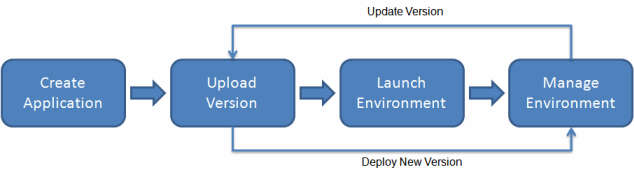
Source: AWS Elastic Beanstalk Developer Guide
Under the hood, Elastic Beanstalk leverages several AWS services to deploy and manage applications:
- EC2 – Runs application instances and provisions capacity based on configuration
- Auto Scaling – Dynamically scales EC2 instances based on defined triggers
- Elastic Load Balancing – Distributes traffic across instances
- S3 – Stores application versions, logs, and other artifacts
- CloudWatch – Monitors application health and resource utilization
- SNS – Sends alerts and notifications
- IAM – Controls permissions to AWS resources
When you deploy an application version to an Elastic Beanstalk environment, it builds out this infrastructure automatically based on your configuration settings. This allows you to get an application up and running quickly without having to manage each service individually.
Benefits and Use Cases
The primary benefit of Elastic Beanstalk is simplified application deployment and management. By acting as an orchestration layer on top of core AWS services, it greatly reduces the learning curve and time to market for deploying applications in the cloud. This is especially valuable for data science and ML teams who may not have deep infrastructure expertise.
Some key benefits and use cases of Elastic Beanstalk include:
- Faster time-to-market – Go from code to a running production application in minutes
- Reduced operational overhead – Automate common deployment tasks and manage infrastructure at scale
- Easy scaling – Meet demand with automatic scaling of EC2 instances
- Customizable configurations – Define environment settings to meet application requirements
- Deploying AI/ML models – Package and deploy models as part of a web application or service
- Running batch jobs – Process datasets or perform model training using the worker environment
According to the 2021 Flexera State of the Cloud Report, 50% of organizations are using PaaS services like Elastic Beanstalk to increase developer productivity and 40% to reduce management of infrastructure. As AI/ML becomes more integral to applications, usage of PaaS to streamline model deployment is likely to grow.
AWS Lambda: Run Code without Servers
While Elastic Beanstalk deploys applications, AWS Lambda lets you run individual functions in a serverless environment. With Lambda, you simply upload your code and define triggers, and the service handles all the underlying compute resources required to run it. Lambda supports a variety of programming languages, including Node.js, Python, Ruby, Java, Go, and C#.
How Lambda Works

Source: AWS Lambda Product Page
Lambda runs code in containerized execution environments, known as function instances. When you invoke a Lambda function, either manually or via an event trigger, Lambda launches an instance of the function and runs the code. If additional requests come in while the first event is being processed, Lambda launches additional instances to handle the increased load.
Some key components of Lambda‘s architecture include:
- Function code and dependencies – Packaged and deployed to Lambda, either directly or in a container image
- Triggers – AWS services, HTTP endpoints, or custom apps that invoke the function
- Execution environment – Secure and isolated runtime environment that provides the compute, memory, and networking for the function
- Logs and metrics – Automatically sent to CloudWatch for monitoring and debugging
Lambda abstracts away all the operational concerns of compute infrastructure, such as server and operating system maintenance, capacity provisioning, automatic scaling, and logging. Developers can focus solely on building business logic in their function code.
Benefits and Use Cases
The serverless model of Lambda offers several benefits, particularly for event-driven and variable workloads common in AI/ML scenarios:
- No server management – Let AWS handle the operational heavy lifting
- Automatic scaling – Seamlessly meet demand with built-in scaling to thousands of concurrent requests
- Pay-per-use pricing – Only incur costs when code is actually running, ideal for intermittent workloads
- Integrated security – Leverage IAM roles and VPC configurations to secure functions and control access to resources
According to the 2021 Serverless Community Survey, 37% of respondents use Lambda in production, with data processing as the top use case. Some common AI/ML scenarios for Lambda include:
- Data preprocessing – Cleanse, normalize, and transform data in real-time as it comes in from streaming sources or storage buckets
- Model inference – Serve ML models at scale for applications like real-time recommendations or fraud detection
- Serverless ETL – Orchestrate data workflows by chaining functions together
- Chatbots – Run conversational AI models to power chat interfaces
- IoT data ingestion – Process and analyze data from IoT devices at the edge
Many organizations have deployed Lambda for large-scale AI/ML workloads:
- GIPHY cut costs by 90% by using Lambda to serve 250,000 requests per minute to their API that uses computer vision models to detect and rate GIFs
- iFood increased model deployment speed by 90% by using Lambda and SageMaker to productionize ML models that predict food delivery times
- CasaONE achieved 300% ROI in 8 months by building a serverless data platform on Lambda to process rental data and train propensity models
Elastic Beanstalk vs Lambda
While both Elastic Beanstalk and Lambda are used for running code in the cloud, they differ in some key ways:
| Characteristic | Elastic Beanstalk | Lambda |
|---|---|---|
| Service model | PaaS | FaaS |
| Unit of deployment | Applications | Functions |
| Infrastructure control | Managed but visible infrastructure | Fully abstracted |
| Scaling | Automatic scaling of EC2 instances | Automatic scaling of function invocations |
| Supported runtimes | Programming languages + Docker | Programming languages |
| Execution duration | Long-running apps | Short-lived tasks (15 min max) |
| Pricing model | Charged for underlying resources provisioned (e.g. EC2) | Charged per request + GB-seconds |
Source: AWS Documentation
In general, Elastic Beanstalk is suited for deploying full applications and services that require more control over the underlying infrastructure. Lambda is ideal for event-driven, short-running tasks that can tolerate a slower cold start time.
However, these services can also work together. For example, you could run a web application on Elastic Beanstalk that invokes Lambda functions to perform certain ML tasks like generating recommendations or detecting fraud. This allows you to leverage the benefits of both services.
Creating an Elastic Beanstalk Environment
Here‘s a step-by-step guide to deploying a sample application with Elastic Beanstalk:
- Open the Elastic Beanstalk console
- Click "Create Application"
- Enter a name and choose a platform (e.g. Python)
- Upload your application code
- Configure the environment settings (instances, capacity, load balancing, etc.)
- Create and launch the environment
- Open the application URL to test
For a more detailed walkthrough, see the AWS Elastic Beanstalk documentation.
Creating a Lambda Function
Here‘s how to create and test a Lambda function:
- Open the Lambda console
- Click "Create function"
- Choose a runtime (e.g. Python) and give the function a name
- Add your function code via the inline editor, uploading a .zip, or specifying a container image
- Configure the execution role permissions
- Set up an event trigger (e.g. S3 notification)
- Click "Deploy"
- Create a test event and click "Test" to invoke the function
Check out the AWS Lambda documentation for more details and examples.
The Future of PaaS and FaaS
The rise of managed application platforms and serverless compute has transformed software development, and will play a key role in accelerating AI/ML innovation. By abstracting away infrastructure concerns, these services democratize machine learning, allowing any developer to easily deploy models and focus on building intelligent features.
Gartner predicts that by 2025, 95% of new digital workloads will be deployed on cloud-native platforms, up from 30% in 2021. As the volume and velocity of data continues to grow, leveraging elastic, on-demand infrastructure will become critical to building scalable AI/ML applications.
At the same time, cloud providers are releasing more managed AI/ML services that build on top of PaaS and FaaS offerings:
- AWS SageMaker lets data scientists build, train, and deploy ML models with integrated Jupyter notebooks, managed training infrastructure, and one-click model deployment
- Google Vertex AI unifies the ML workflow from data ingestion to model monitoring, with pre-built models and AutoML capabilities
- Azure Machine Learning offers tools for the complete ML lifecycle, with support for popular frameworks like PyTorch and Tensorflow
By combining the ease of use of PaaS/FaaS with the power of managed AI/ML services, developers will be able to infuse machine learning into applications faster than ever before. I predict a surge in intelligent apps leveraging natural language processing, computer vision, and predictive analytics deployed via serverless functions and managed ML services.
Conclusion
AWS Elastic Beanstalk and Lambda are two powerful services for deploying code in the cloud. Elastic Beanstalk provides a managed platform for running applications, while Lambda offers event-driven serverless compute. Both services abstract away infrastructure management to let developers focus on writing code.
For AI/ML workloads, Elastic Beanstalk can be used to deploy intelligent applications and services, while Lambda can handle data processing, model inference, and other event-driven ML tasks. When combined with managed AI/ML services, these form a compelling toolset for infusing machine learning into production applications.
While we covered the key concepts of Elastic Beanstalk and Lambda in this guide, there‘s always more to learn. I encourage you to dive into the AWS documentation, build some sample projects, and think about how you can leverage these services in your own AI/ML work. The cloud is constantly evolving, so keep up with the latest developments around serverless, PaaS, and AI services.
Good luck on your CCP exam and your AI/ML journey!
References
- AWS Elastic Beanstalk Developer Guide: https://docs.aws.amazon.com/elasticbeanstalk/latest/dg/Welcome.html
- AWS Lambda Developer Guide: https://docs.aws.amazon.com/lambda/latest/dg/welcome.html
- 2021 Flexera State of the Cloud Report: https://info.flexera.com/CM-REPORT-State-of-the-Cloud
- 2021 Serverless Community Survey: https://serverlessedge.com/serverless-community-survey-2021-key-findings
- 10 AWS Lambda Use Cases to Start Your Serverless Journey: https://aws.amazon.com/blogs/compute/10-aws-lambda-use-cases-to-start-your-serverless-journey/
- Gartner Predicts 2022: Cloud-Native Platforms Serve as the Foundation for Modern Applications: https://www.gartner.com/en/articles/predicts-2022-cloud-native-platforms-serve-as-the-foundation-for-modern-applications