Google‘s What-If Tool Enables Code-Free Machine Learning Experimentation
Machine learning (ML) has become an integral part of many applications and systems we use every day, from spam filters and product recommendations to self-driving cars and medical diagnosis systems. However, building effective ML models is not a straightforward process. It requires iterating through multiple experiments, tweaking model parameters, analyzing results, and gradually improving performance. Traditionally, this experimentation process has required extensive coding skills, limiting it to experienced programmers.
To make machine learning more accessible and streamline the experimentation process, Google has created the What-If Tool. First released in 2018, the What-If Tool is an interactive visual interface that enables users to probe ML models and analyze their behavior without the need to write any code. It is part of TensorBoard, Google‘s open source platform for inspecting and visualizing ML models.
How the What-If Tool Works
At its core, the What-If Tool allows users to interact with an already trained ML model and ask hypothetical questions to see how the model behaves. Users can manually edit examples from the dataset used to train the model and see in real-time how those changes affect the model‘s predictions.
For example, consider using an ML model to decide whether to approve a loan application. With the What-If Tool, a user could adjust input parameters like the applicant‘s income, credit score, or other features to see if it changes whether the model approves or rejects the application. This type of exploratory analysis can provide valuable insights into the model‘s decision making process.
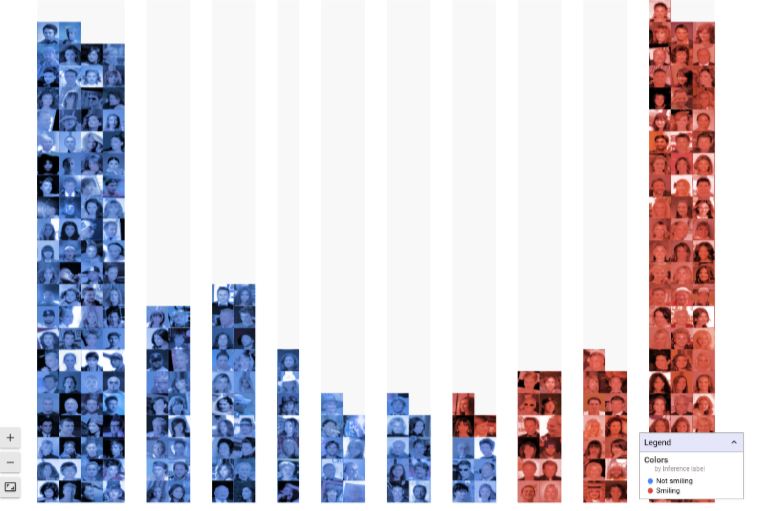
The tool also enables users to generate plots and visualizations with minimal effort. It can automatically create plots showing how the model‘s predictions change when individual features are adjusted. This makes it easy to identify which features the model considers most important in making its predictions. The What-If Tool also provides an intuitive way to visualize datasets, helping users understand the distribution of different features and potentially spot problems like class imbalances or outliers.
Another key capability is the ability to evaluate a model‘s fairness and robustness across different subgroups. Users can slice their dataset based on sensitive attributes like age, gender, or race. The What-If Tool will then show performance metrics for each subgroup, making it easy to see if the model exhibits any bias or uneven performance. It also enables comparison to an ideal fairness baseline.
How the What-If Tool Fits Into The ML Workflow
The traditional machine learning workflow involves several stages:
- Data preparation – Collecting, cleaning, and preprocessing data to use for training
- Model training – Selecting an appropriate model architecture and training it on the prepared data
- Model evaluation – Assessing the trained model‘s performance using metrics like accuracy or F1 score
- Model tuning – Adjusting hyperparameters and other settings to optimize performance
- Model deployment – Integrating the tuned model into a production environment to generate predictions on new data

The What-If Tool is designed to enhance the model evaluation and tuning stages by providing an easy, code-free way to analyze a model‘s behavior. Users can quickly test different hypothetical scenarios and see how the model responds without having to rerun training scripts or write evaluation code. Insights gained from the What-If Tool can inform further rounds of tuning or flag potential issues before a model moves to deployment.
Benefits and Applications
The What-If Tool provides a range of benefits to teams and individuals working on machine learning projects:
-
Faster experimentation – The visual, code-free interface enables users to rapidly test different ideas and hypothetical scenarios. There‘s no need to write new scripts or rerun training pipelines for every experiment.
-
Accessible to non-programmers – The tool makes machine learning more accessible to team members like product managers, domain experts, and other stakeholders who may not have a programming background. This enables more active participation throughout the model development process.
-
Easier debugging – When a model isn‘t working as expected, the What-If Tool provides an easy way to dive in and investigate the root causes. Users can manually test different examples to reproduce errors or explore edge cases.
-
Fairness and bias testing – Many machine learning applications, like loan approvals or resume screening, can have major consequences on people‘s lives. The What-If Tool helps teams assess their models for fairness and identify potential bias against protected groups before deploying to production.
-
Better communication and collaboration – The tool provides an intuitive, visual interface for team members to interact with ML models and datasets. This facilitates collaborative analysis and decision making among technical and non-technical stakeholders.
Some examples of how the What-If Tool can be applied across industries include:
-
Healthcare – Medical diagnosis models where doctors can interactively test the impact of different patient symptoms and biomarkers on the predicted diagnosis to better understand the model‘s reasoning
-
Finance – Loan approval or credit risk models where an analyst can check for bias against protected groups and simulate how predictions change for applicants with different financial profiles
-
Human Resources – Resume screening models where an HR team can audit for unfair bias and test how the model responds to candidates with different demographic backgrounds or qualifications
-
Retail – Product recommendation engines where a product manager can explore how recommendations change for different customer profiles or adjust product attributes to see the effect on recommendations
-
Autonomous Vehicles – Self-driving car perception models where an engineer can visualize how the system responds to challenging or adversarial scenarios and identify potential weaknesses to address
-
Research & Education – Any academic or educational context where students and researchers want an accessible, hands-on way to learn about machine learning models and experiment with different architectures and datasets
Trends in Code-Free Machine Learning
The What-If Tool reflects a broader trend towards making machine learning more accessible to non-programmers and domain experts. As the demand for ML applications grows across industries, there has been a surge of interest in tools and platforms that streamline the model building process. This includes the rise of so-called "AutoML" solutions that automate tasks like algorithm selection, hyperparameter tuning, and even feature engineering.
Leading tech companies and cloud providers have embraced this trend by releasing code-free ML tools aimed at business users and analysts:
| Tool | Provider | Key Features |
|---|---|---|
| What-If Tool | Visual interface to analyze TensorFlow models without code | |
| Azure ML Studio | Microsoft | Drag-and-drop interface to build and deploy ML models |
| Amazon SageMaker Autopilot | Amazon | Automates ML model building with a few clicks |
| Ludwig | Uber | Trains deep learning models using only a CSV file and YAML config |
| Lobe | Microsoft | Builds custom deep learning models via a simple visual interface |
According to a 2020 Kaggle survey, nearly 40% of data scientists and ML practitioners are now using some form of automated machine learning. And the market for AutoML solutions is expected to grow from $269 million in 2019 to $14.5 billion by 2030, representing a compound annual growth rate of 43%.
Transparent and Explainable ML Models
The What-If Tool also reflects a push across the industry towards ML models that are more transparent and explainable. As machine learning is applied to more high-stakes decisions, there is growing concern about "black box" models that make predictions without clear explanations of their reasoning. This has led to the rise of the field of Explainable AI (XAI) which seeks to develop methods for understanding and interpreting the outputs of ML models.
Google has stated that one of the key motivations behind the What-If Tool was to give users more insight into how models make decisions. By letting users interact with models and visualize their results, the tool aims to make ML feel less like an opaque black box and more like an comprehensible glass box.
The What-If Tool includes several XAI-inspired features such as counterfactual examples (showing how a prediction changes when a single feature is modified) and SHAP value plots (showing how much each feature contributes to a particular prediction). These capabilities align with Google‘s stated AI principles, which emphasize developing AI systems that are transparent, accountable, and aligned with human values.
As Wes Chun, a developer advocate at Google, explained the goals of the What-If Tool:
"Machine learning has the power to make decisions that affect people‘s lives… With the What-If Tool, you can examine your ML model directly for things like fairness and bias across different subgroups. You can manipulate your test dataset, specific data points, and data features to see the potential effects on the model…"
Of course, code-free interfaces like the What-If Tool are not a complete solution for AI transparency and explainability. In fact, some have argued that these tools could give a false sense of accessibility without surfacing all the complex details of how models operate under the hood. Even with a code-free tool, a baseline level of ML knowledge is still required to meaningfully interpret results.
Additionally, it‘s important to recognize that not all aspects of modern machine learning systems are amenable to easy "what if" exploration and visualization. For example, many deep learning models learn complex, uninterpretable feature representations that can be difficult to manipulate in a graphical interface. And the What-If Tool currently has limited support for more advanced techniques like reinforcement learning or unsupervised learning.
The Future of Human-AI Interaction
Looking ahead, code-free ML tools like the What-If Tool represent an exciting frontier in the quest to make artificial intelligence more accessible and collaborative. Traditionally, AI development has been restricted to a relatively small group of highly specialized data scientists and programmers. But as the field matures, there is growing recognition that AI needs input from a diversity of voices, including social scientists, ethicists, domain experts, policymakers, and those affected by AI systems.
Edward Choi, an AI research scientist at Google, described the What-If Tool as a step towards this more inclusive vision of AI development:
"We hope that this tool will be the first step towards creating a new machine learning workforce of non-programmers… With this tool, we really want to empower everybody – those who know how to program and those who may have other domain specific expertise that could be very useful."
Ultimately, the goal of code-free AI tools is not to replace programming entirely, but rather to facilitate more collaboration and communication between technical and non-technical stakeholders. Just as graphical interface tools like Photoshop have not eliminated the need for skilled graphic designers and artists, code-free ML tools are unlikely to replace the need for trained data scientists and engineers. But they can help break down barriers and enable more people to productively participate in the AI development process.
In the coming years, we can expect to see continued progress in making machine learning more accessible and collaborative. This may take the form of more advanced code-free tools that support additional ML architectures and use cases. It could also involve tighter integration between code-free interfaces and traditional programming environments, allowing technical and non-technical users to seamlessly collaborate.
More broadly, the evolution of tools like the What-If Tool reflects a shift in how we conceptualize interactions between humans and AI systems. Rather than a unidirectional flow from human-generated data to AI-produced outputs, the future may involve a more bidirectional and iterative exchange. In this vision, humans and AI systems work together in a continuous cycle of feedback and refinement, each leveraging their unique strengths to enhance the capabilities of the other.
Of course, this collaborative future also raises new challenges around issues like data privacy, intellectual property rights, and the attribution of responsibility for AI-driven decisions. As code-free ML tools expand access to wider audiences, there will be a need for governance frameworks and ethical guidelines to ensure these technologies are developed and deployed responsibly.
Initiatives like Google‘s PAIR (People + AI Research) program, which produced the What-If Tool, reflect a growing awareness of these challenges. By proactively studying the social impacts of AI and developing tools for productive human-AI interaction, Google and other leaders in the field aim to steer the technology towards beneficial outcomes.
The road ahead for code-free machine learning is sure to be an exciting one. As tools like the What-If Tool continue to mature and expand, they have the potential to greatly democratize access to AI and accelerate the development of more transparent, accountable, and human-centered systems. While there will always be a vital role for skilled programmers and researchers to push the technical boundaries of the field, code-free interfaces provide a powerful complementary path for broad participation. Together, these approaches can help ensure that the future of artificial intelligence is one that works for the benefit of all.